

HR software pricing comes down to a billing unit, a plan tier and the fees around the subscription. Most cloud HR tools charge per employee or per user each month, payroll tools add a base fee, and enterprise plans are quoted case by case. This guide shows what each of the eight HR software types bills on, which costs sit outside the subscription, and how to test the return before you commit budget to your HR processes tooling.
Which HR software types are priced differently?
Eight HR software types exist, and each bills on a different unit, which is why quotes are hard to compare. Here are the main HR Software types:
- Human Resource Management System (HRMS): Comprehensive solutions that cover multiple HR functions.
- Human Resource Information System (HRIS): Focuses on storing and organizing employee data.
- Applicant Tracking System (ATS): Simplifies and automates the recruitment process.
- Payroll Software: Manages employee compensation and tax filings.
- Performance Management Software: Monitors and assesses employee performance.
- Learning Management System (LMS): Enhances employee training and development.
- Time and Attendance Software: Monitors employee work hours and absences.
- Employee Scheduling Software: Helps manage shift schedules for hourly workers.
Most companies combine several of these. A Human Resource Management System bundle can replace separate payroll, time and performance tools, but its price depends on which modules you switch on.
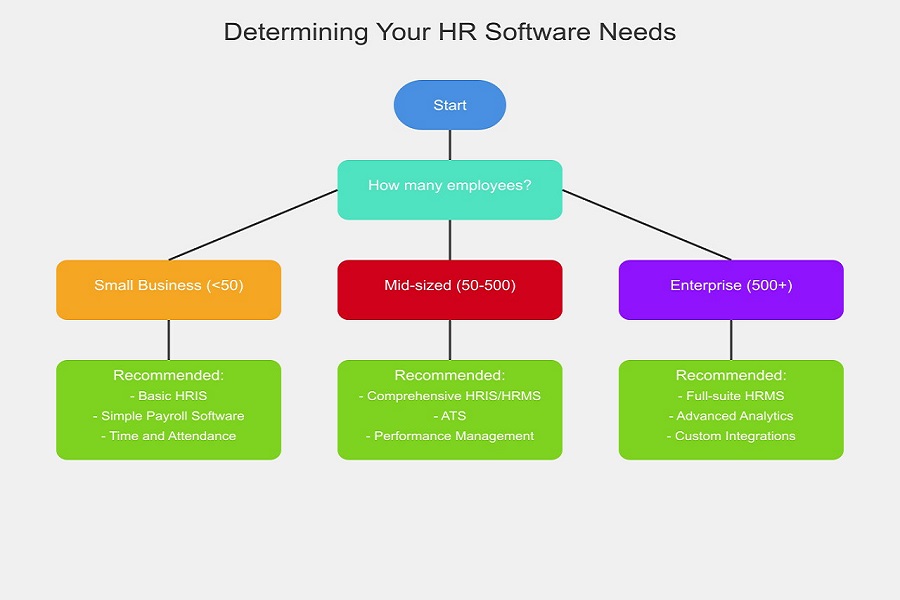
HR Software Needs
What drives the cost of HR software?
Eight factors move the quote for HR software, and headcount and module count move it most:
- Number of Users: Most HR software is priced per user or per employee.
- Features and Functionality: More advanced features typically come at a higher price.
- Customization Needs: Adapting the software to your specific requirements adds cost.
- Deployment Model: Cloud-based solutions often have different pricing structures than on-premises options.
- Support and Maintenance: The quality of customer support and frequency of software updates can influence the pricing.
- Integration Capabilities: The ability to integrate with other business systems may impact costs.
- Scalability: Software that grows with your business usually comes in pricing tiers, so check where your headcount crosses a tier line.
- Compliance Features: Tools that help with regulatory compliance often sit in higher tiers.
How is HR software priced?
Vendors price HR software per user per month, as a flat fee, pay-as-you-go, in tiers, freemium or by custom quote, and many mix two of these:
- Per User, Per Month: A common model for cloud-based solutions, charging based on the number of users.
- Flat Fee: A set price for access to the software, regardless of the number of users.
- Pay-as-you-go: Charges based on actual usage of specific features or services.
- Tiered Pricing: Provides multiple levels of functionality at different price tiers.
- Freemium: Basic features are free, with advanced functionality charged.
- Custom Pricing: Tailored pricing based on an organization’s specific needs, common for enterprise-level solutions.
Match the model to your headcount pattern. Per-employee pricing suits a steady workforce. A flat fee suits fast growth, because adding people doesn’t raise the bill. Pay-as-you-go suits seasonal or project-based hiring. Whichever you pick, ask whether you pay for all employees or only active ones.
Also Read: HR Software Features: Ultimate Guide to Revolutionizing HR
What does each type of HR software charge for?
Each HR software type bills on a different unit, and vendors publish prices inconsistently. So this section shows what you’ll be charged for, not dollar ranges. Take the numbers from each vendor’s own pricing page.
HRMS/HRIS Pricing
HRMS and HRIS platforms usually charge per employee per month, and larger employers get custom quotes. Core employee records cost less than payroll, benefits or talent modules, so price the modules you need, not the bundle. Check whether the vendor sets a minimum monthly fee.
Applicant Tracking System (ATS) Pricing
Applicant tracking systems charge per user, per open job or by company size, depending on the vendor. Cost follows recruiters and active requisitions, not total headcount. A small company hiring heavily can pay more than a large one that hires rarely.
Payroll Software Pricing
Payroll software commonly combines a base fee with a per-employee charge each month or pay run. Ask whether tax filing, year-end forms and off-cycle runs sit in the base fee or are billed separately.
Performance Management Software Pricing
Performance management tools charge per employee per month. Review cycles, goal tracking and 360-degree feedback often sit in different tiers, so confirm which ones your plan includes.
Learning Management System (LMS) Pricing
Learning management systems bill on active learners, registered users or catalog size. Registered and active counts can differ widely, so ask which one the vendor uses.
Time and Attendance Software Pricing
Time and attendance software charges per user per month. Hardware such as clocks or biometric terminals is often a separate line, and features like overtime rules and payroll sync usually sit in higher tiers.
Employee Scheduling Software Pricing
Employee scheduling software charges per user or per location. Confirm whether staff who only view and swap shifts count as paid users, since they make up most of an hourly workforce.
Don’t budget from a range on any blog, this one included. Pull the figure from the vendor’s pricing page for the exact plan. Where it says “contact sales”, write “not published” in your comparison sheet until you hold a written quote.
Which costs sit outside the subscription price?
Eight costs typically sit outside the subscription line, and implementation and data migration are the two buyers miss most often. The HR software implementation guide shows how setup work breaks down:
- Implementation Fees: One-time charges for system setup.
- Data Migration: Costs associated with transferring existing data to the new system.
- Training: Expenses for teaching employees how to use the new software.
- Customization: Fees for tailoring the software to your specific needs.
- Integration: Costs for connecting the HR software with other business systems.
- Upgrades: Charges for accessing new features or improved versions.
- Support: Additional fees for premium customer support.
- Contract Termination: Possible fees for terminating a contract before its completion.
Ask each vendor to quote all eight lines in writing. Read the renewal and early-termination terms before you sign, not after.
Also Read: HR Software Benefits – Transforming Modern Businesses
How do you calculate ROI for HR software?
Compare what the software saves or earns each year against what it costs. Use this formula:
ROI = (Annual benefit – Investment cost) / Investment cost
Measure these five inputs:
- Time Savings: Reduction in hours spent on HR tasks.
- Error Reduction: Decrease in costly mistakes in payroll or compliance.
- Improved Productivity: Increase in overall employee efficiency.
- Reduced Turnover: Savings from improved employee retention.
- Faster Hiring: Reduced time-to-hire and associated costs.
Worked example with assumed numbers
Suppose a company with 100 employees invests in an HRIS costing $10,000 per year. The software saves 20 hours per week of HR staff time (valued at $50/hour) and reduces hiring costs by $20,000 annually.
Annual benefit: (20 hours * 52 weeks * $50) + $20,000 = $72,000. ROI = ($72,000 – $10,000) / $10,000 = 6.2, or 620%.
These inputs are assumptions for illustration, not benchmarks. Twenty saved hours a week is an aggressive figure, so run the sum with hours you have measured.
How do you choose HR software on a budget?
Shortlist by the unit you’ll be billed on first, then by features. A cheap per-user price can end up costing more than a flat fee once your headcount grows.
- Assess Your Needs: Identify your organization’s specific HR challenges and goals.
- Consider Scalability: Select software that can expand and adapt as your business grows.
- Evaluate User-Friendliness: Ensure the interface is intuitive for all users.
- Evaluate Integration Capabilities: Ensure the software is compatible with your current systems.
- Review Security Features: Ensure the software meets data protection standards.
- Analyze Customer Support: Consider the level and availability of vendor support.
- Read User Reviews: Look for feedback from businesses similar to yours.
- Request Demos: Try before you buy to ensure the software meets your needs.
- Compare Total Cost of Ownership: Look beyond the sticker price to understand long-term costs.
Where is HR software pricing heading?
Three pricing shifts are worth watching, because each can change what a plan covers at renewal:
- AI Features: Some vendors sell AI features as paid add-ons or higher tiers. Ask whether they’re in your plan.
- Modular Pricing: Many vendors let you pay per module. Compare module by module, not bundle to bundle.
- Predictive Analytics: Advanced analytics usually sits in upper tiers. Confirm that before you rely on it.
Because these add-ons change what a plan covers, check every renewal quote against the scope of your current HR software.
Build a one-page quote comparison before any demo
List your headcount, the modules you need and the billing unit each vendor uses before you book a demo. Then request written quotes from three vendors that cover all eight hidden-cost lines.
Put them side by side in one sheet and mark unpublished prices as “not published”. Compare total first-year cost, not the monthly list price, and run the ROI sum with your own measured hours.
Frequently asked questions
How much does HR software cost?
There’s no single number, because cost depends on the software type, your headcount and the modules you buy. Most cloud tools bill per employee or per user each month, and enterprise plans are usually quoted individually. Take figures from each vendor’s own pricing page and request a written quote where prices aren’t published.
Is HR software priced per employee or per user?
It depends on the type. HRMS, HRIS and performance tools usually bill per employee, while applicant tracking and scheduling tools often bill per user or per location. Always ask which headcount the vendor counts.
Is there free HR software?
Some vendors offer a freemium plan with basic features at no charge. Advanced functions are paid, and free plans often limit employee numbers or modules. Check those limits before you build your process around one.
What costs are not included in the subscription price?
Implementation, data migration, training, customization, integrations, upgrades, premium support and contract termination can all be billed separately. Ask each vendor to quote them in writing so you can compare total first-year cost.
How do you calculate the ROI of HR software?
Subtract the investment cost from the annual benefit, then divide by the investment cost. Count time saved, errors avoided, turnover reduced and faster hiring, using hours and costs you’ve measured rather than vendor claims.
Add SocialAtoZ as a preferred source
See us more often in your Google results.