
Make your music. Create any song. Just imagine it.
22 tools compared
Best Music Management software
Music management software is designed to help individuals and organizations organize, catalog, and manage their music collections. These solutions provide tools for handling various aspects of music organization, including metadata management, playlist creation, and playback.
More about Music Management software
Key capabilities include:
- Music Cataloging and Metadata Management
- Playlist Creation and Management
- Audio File Organization and Sorting
- Playback and Streaming Integration
- Tagging and Search Functionality
- Reporting and Analytics
Music management software assists users in efficiently managing their music libraries by offering features for cataloging, organizing, and accessing audio files. By providing tools for playlist creation, metadata management, and integration with playback systems, these solutions enhance the overall music management experience.
To qualify for the Music Management Software category, a product must:
- Provide features for cataloging and managing music collections, including metadata and file organization.
- Support tagging, search functionality, and reporting to optimize music organization and access.
The core value proposition is enabling users to effectively organize and manage their music collections, streamline playlist creation, and enhance playback experiences through comprehensive music management software solutions.
Music Management software Compared
Compare the 10 most relevant Music Management software options on price, free trial and deployment.
| Product | Starting price | Free trial | Free plan | API | Deployment |
|---|---|---|---|---|---|
 Udio Make your music. Create any song. Just imagine it. Udio Make your music. Create any song. Just imagine it. | $8/month | ✓ | ✓ | – | Cloud Based |
 Mureka AI Unlock unlimited AI music Mureka AI Unlock unlimited AI music | $7.17/month | ✓ | ✓ | ✓ | Cloud Based |
 rekordbox (Pioneer DJ) Pioneer DJ's software for track preparation, performance, and cloud library… rekordbox (Pioneer DJ) Pioneer DJ's software for track preparation, performance, and cloud library… | $12/month | – | ✓ | – | Hybrid |
 Serato DJ Professional DJ performance software with stem separation, effects, and deep… Serato DJ Professional DJ performance software with stem separation, effects, and deep… | $11.99 | – | ✓ | – | On Premises |
 Plex Personal media server for streaming your own movies, TV, music,… Plex Personal media server for streaming your own movies, TV, music,… | $2.99/month | ✓ | ✓ | ✓ | Hybrid |
 foobar2000 Free, lightweight, highly customizable audio player for Windows, macOS, iOS,… foobar2000 Free, lightweight, highly customizable audio player for Windows, macOS, iOS,… | Free | – | ✓ | – | On Premises |
 Roon Subscription based music player and library manager for high fidelity… Roon Subscription based music player and library manager for high fidelity… | $12.49 | ✓ | – | – | Hybrid |
 MediaMonkey Media jukebox for organizing, tagging, converting, and syncing large audio… MediaMonkey Media jukebox for organizing, tagging, converting, and syncing large audio… | $39.95 | – | ✓ | – | On Premises |
 MusicBee Free, highly customizable music manager and player for Windows audio… MusicBee Free, highly customizable music manager and player for Windows audio… | Free | – | ✓ | – | On Premises |
 Mixed In Key Harmonic mixing and key detection software for DJs and music… Mixed In Key Harmonic mixing and key detection software for DJs and music… | $7.99/month | ✓ | – | – | On Premises |
Your product in this list? Sponsored top-5 positions in Music Management software from $19/month.
All Software
22 Best Music Management software Options
Showing 1 - 10 of 22 products
Udio is an AI-powered music creation platform that lets users turn text prompts into original songs in seconds. Designed for musicians, producers, songwriters, content creators, and hobbyists, Udio makes it easy to generate personalized tracks without needing traditional music production skills or expensive studio tools. The platform supports a wide range of styles and moods, from lo-fi and synthwave to rock, country, pop, and electronic music, making it useful for everything from social content and demos to creative experimentation and inspiration.
Its standout value lies in its simple prompt-based workflow and creator-friendly editing tools, including options to extend, remix, inpaint, and upload audio for AI-assisted editing. Whether you want to build a quick soundtrack for a project or explore new musical ideas, udio helps streamline the entire process from concept to finished track. For anyone looking for a fast, accessible, and highly creative music generator, Udio is a compelling option.
Explore additional details
Explore various Keka features, compare the pricing plans, and unlock the potential of seamless operations by selecting the right software for your business.
Features
View all Udio Features- Text-to-Music Generation
- AI Music Editing Tools
- Audio Upload Support
- Creative Prompting Workflow
- Community and Discovery
- Genre and Style Flexibility
Pricing
Udio Caters to
- StartUps
- SMEs
- Agencies
- Enterprises
Unlock unlimited AI music
Mureka AI is an AI-powered music creation platform built for creators who want to generate original songs, background tracks, vocals, and speech quickly without traditional studio workflows. Users can turn a simple prompt, lyric idea, or reference track into polished, royalty-free music in minutes. It is useful for content creators, marketers, podcasters, indie musicians, game developers, and social media teams that need fast, customizable audio for videos, ads, games, and streaming content.
The platform combines text-to-music generation, vocal options, lyric support, remixing, and advanced editing tools in one web-based workflow. It also stands out for its multilingual interface, model choices, commercial-use focus, and export options such as MP3, WAV, stems, and video.
Explore additional details
Explore various Keka features, compare the pricing plans, and unlock the potential of seamless operations by selecting the right software for your business.
Features
View all Mureka AI Features- AI Music Generation
- Advanced Music Editing
- Vocal and Lyrics Tools
- Export and Output Options
- Model and Style Controls
- Creator Workflow Features
- Multilingual and Global Access
Pricing
Mureka AI Caters to
- StartUps
- SMEs
- Agencies
- Enterprises
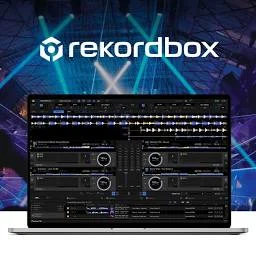
Pioneer DJ's software for track preparation, performance, and cloud library sync
rekordbox is Pioneer DJ's software for preparing, analyzing, and performing DJ sets, built to work seamlessly with CDJ players and DJ controllers. It automatically detects BPM, key, and beatgrids, isolates vocals and instrumental stems with AI, and supports full mixing and effects in Performance Mode, plus a Lighting Mode that syncs music to DMX compatible show lighting.
The Free plan covers core track preparation and library management, while paid Core, Creative, and Professional subscriptions add Cloud Library Sync across multiple devices along with growing amounts of Dropbox storage, up to 5TB on the Professional tier. Mobile apps for iOS and Android now include the same performance features as the desktop version, and monthly or discounted annual billing is available on every paid tier.
Explore additional details
Explore various Keka features, compare the pricing plans, and unlock the potential of seamless operations by selecting the right software for your business.
- AI powered vocal, drum, bass, and instrumental stem separation
- Automatic BPM, key, and beatgrid analysis
- Automatic Hot Cue and Memory Cue placement
- Cloud Library Sync across multiple devices
- Performance Mode with full mixing and effects
- DVS support and Lighting Mode for DMX shows
- Mobile apps for iOS and Android with performance capability
- Smart playlists and tag based organization
- CDJ and DJ controller hardware integration
Pricing
rekordbox (Pioneer DJ) Caters to
- StartUps
- SMEs
- Agencies
- Enterprises
Professional DJ performance software with stem separation, effects, and deep hardware support
Serato DJ Pro is professional DJ performance software used with a wide range of controllers, mixers, and turntables from more than 100 supported hardware brands. It offers simple and smart beat syncing, four deck mixing, real time stem separation to isolate vocals or instrumentals, key detection for harmonic mixing, and over 50 built in effects, alongside Smart Crates and tagging tools for managing large track libraries.
A free entry level version called Serato DJ Lite requires no license, while Serato DJ Pro is available as an $11.99 monthly subscription or a $299 one time perpetual license. A Serato DJ Suite tier adds expansions like DVS timecode control, video mixing, and Pitch n Time DJ for an additional monthly or one time fee.
Explore additional details
Explore various Keka features, compare the pricing plans, and unlock the potential of seamless operations by selecting the right software for your business.
Features
View all Serato DJ Features- Simple and Smart beat sync
- Four deck mixing on supported hardware
- Real time stem separation of vocals, melody, and bass
- Beat Jump and Slicer performance pads
- 50+ built in FX
- Key detection and harmonic mixing display
- Support for 100+ official DJ controllers
- Smart Crates and advanced library tagging
- Set recording
Pricing
Serato DJ Caters to
- StartUps
- SMEs
- Agencies
- Enterprises
Personal media server for streaming your own movies, TV, music, and photos across devices
Plex is a personal media server platform that organizes and streams a user's own movies, TV shows, music, and photos from a home computer or NAS device to any connected screen. The free Plex Media Server automatically scans files and adds posters, cast lists, and episode details, and streams to devices on the same local network without a subscription.
A paid Plex Pass subscription adds remote streaming from anywhere, hardware accelerated transcoding, mobile downloads for offline viewing, DVR recording from an antenna tuner, and features like Skip Intro and ad free playback. Plex Pass is billed monthly, yearly, over five years, or as a one time lifetime purchase, and library sharing with friends and family is available on every tier.
Explore additional details
Explore various Keka features, compare the pricing plans, and unlock the potential of seamless operations by selecting the right software for your business.
Features
View all Plex Features- Automatic media organization with posters and metadata
- Local network and remote streaming
- On the fly hardware accelerated transcoding
- Mobile sync and offline downloads
- DVR recording with an antenna tuner
- Library sharing with friends and family
- Skip Intro and Skip Credits
- Ad free streaming for on demand and Live TV
- Plexamp dedicated music player app
Pricing
Plex Caters to
- StartUps
- SMEs
- Agencies
- Enterprises
Free, lightweight, highly customizable audio player for Windows, macOS, iOS, and Android
foobar2000 is a free, advanced audio player for Windows, macOS, iOS, and Android built around a lightweight and highly customizable design. It supports a wide range of formats including FLAC, ALAC, WavPack, AIFF, and Opus, and includes gapless playback, ReplayGain volume normalization, and DSP effects such as equalization and crossfading, all wrapped in a fully skinnable interface.
An open component architecture lets third party developers extend the player with additional encoders, visualizations, and tools, while built in features cover audio CD ripping, format transcoding, and advanced tagging. foobar2000 carries no telemetry or data collection, and remains completely free with no subscriptions or locked features.
Explore additional details
Explore various Keka features, compare the pricing plans, and unlock the potential of seamless operations by selecting the right software for your business.
Features
View all foobar2000 Features- Support for FLAC, ALAC, WavPack, AIFF, Opus, and more
- Gapless playback and ReplayGain volume normalization
- DSP effects including equalization and crossfade
- Fully customizable, skinnable interface
- Advanced tagging tools
- Audio CD ripping and format transcoding
- Open component architecture for third party plugins
- No telemetry or data collection
Pricing
foobar2000 Caters to
- StartUps
- SMEs
- Agencies
- Enterprises
Subscription based music player and library manager for high fidelity home audio systems
Roon is a subscription based music player and library management platform aimed at serious home audio enthusiasts. It merges local music files with TIDAL and Qobuz streaming into a single browsable library enriched with artist bios, reviews, credits, and lyrics, and its audio engine supports bit perfect playback up to 384kHz or 24 bit and DSD256 across more than a thousand compatible hardware devices.
Roon also provides multi room playback to AirPlay, Chromecast, and Roon Ready speakers, along with advanced DSP tools like upsampling, parametric EQ, and room correction. It is available as a monthly or annual subscription, or as a one time lifetime purchase, and every plan starts with a free trial.
Explore additional details
Explore various Keka features, compare the pricing plans, and unlock the potential of seamless operations by selecting the right software for your business.
Features
View all Roon Features- Unified library across local files and TIDAL or Qobuz streaming
- Rich metadata including bios, reviews, credits, and lyrics
- Multi room audio to AirPlay, Chromecast, and Roon Ready devices
- Bit perfect playback up to 384kHz/24 bit and DSD256
- Advanced DSP including upsampling, parametric EQ, and room correction
- Focus and Valence powered music discovery search
- Compatibility with 1000+ hardware devices from 200+ brands
- Mobile remote control apps for iOS and Android
Pricing
Roon Caters to
- StartUps
- SMEs
- Agencies
- Enterprises
Media jukebox for organizing, tagging, converting, and syncing large audio and video libraries
MediaMonkey is a media jukebox and library manager designed to organize very large collections of music, podcasts, audiobooks, and video across hard drives, USB devices, network locations, and cloud storage. Its free base version handles everyday playback and tagging, while auto tagging tools retrieve missing album art, lyrics, and metadata from online databases, and smart playlists keep libraries organized automatically.
A paid Gold license unlocks additional tools such as automatic file organization, multiple media collections, and format conversion, sold as either a single version license or a lifetime upgrade. MediaMonkey also streams to Chromecast, DLNA devices, and televisions, and includes a companion Android app for on the go listening.
Explore additional details
Explore various Keka features, compare the pricing plans, and unlock the potential of seamless operations by selecting the right software for your business.
Features
View all MediaMonkey Features- Auto tagging and metadata retrieval from online databases
- Smart and dynamic playlist management
- Podcast subscriptions and internet radio support
- Audio and video format conversion
- Audio CD ripping
- Casting and streaming to Chromecast, DLNA, and TVs
- Sync with Android, USB, and network devices
- Manages libraries of over 100,000 files
- Skinnable, customizable interface
- Gold tier automatic file organization
Pricing
MediaMonkey Caters to
- StartUps
- SMEs
- Agencies
- Enterprises
Free, highly customizable music manager and player for Windows audio enthusiasts
MusicBee is a free, donation supported music manager and player built for Windows. It organizes large personal audio libraries with automatic tagging, album art retrieval, and metadata syncing, while offering audiophile grade playback through WASAPI and ASIO support, a multi band equalizer, and gapless output. Users can import existing libraries from iTunes or local folders and browse them through a fully customizable interface with skins and layouts.
Beyond playback, MusicBee includes a built in CD ripper and audio format converter, support for classic Winamp plugins, and syncing with Android devices. It has no subscription fees or paid tiers; the developer accepts optional voluntary donations but never requires payment for any feature.
Explore additional details
Explore various Keka features, compare the pricing plans, and unlock the potential of seamless operations by selecting the right software for your business.
Features
View all MusicBee Features- 10 or 15 band equalizer and DSP effects
- WASAPI and ASIO support with gapless playback
- Library import from iTunes or local folders
- Automatic track tagging and album art downloading
- Built in CD ripper and audio format converter
- Android device library syncing
- Support for Winamp plugins
- Customizable skins and layouts
- Smart and auto playlists
- Upmix stereo to 5.1 surround sound
Pricing
MusicBee Caters to
- StartUps
- SMEs
- Agencies
- Enterprises
Harmonic mixing and key detection software for DJs and music producers
Mixed In Key is desktop software that scans a music library and detects the musical key and energy level of each track, displaying results using the Camelot system to help DJs build harmonically compatible sets. It also places automatic cue points at the start of musical phrases. Mixed In Key Live extends this to real time key detection of any audio playing on the computer, and a Studio Edition plugin brings key and scale detection into DAWs such as Ableton Live, Logic Pro, and FL Studio.
The software is sold both as a recurring subscription and as one time perpetual licenses at Standard, Pro, and Suite tiers, with a 14 day free trial that requires no payment card. A separate Satellite product provides team based collaboration and library sharing for a monthly or annual fee.
Explore additional details
Explore various Keka features, compare the pricing plans, and unlock the potential of seamless operations by selecting the right software for your business.
Features
View all Mixed In Key Features- Automatic musical key detection using the Camelot system
- Energy level rating from 1 to 10 for every track
- Automatic cue point placement at phrase boundaries
- Mixed In Key Live real time key analysis
- Studio Edition plugin for DAWs
- Satellite team collaboration and library sharing
- Compatible with Serato, rekordbox, and Traktor libraries
- Batch scanning of large music collections
Pricing
Mixed In Key Caters to
- StartUps
- SMEs
- Agencies
- Enterprises
Music Management software Buyer's Guide
Music management software covers three different jobs, and the products listed here split along them: organising a personal music library (MusicBee, MediaMonkey, foobar2000, Roon, Plex, SongKong, bliss), preparing and playing DJ sets (rekordbox, Serato DJ, Traktor, VirtualDJ, djay Pro, Mixed In Key, Beatport LINK), and running the business side of a catalogue (Reprtoir, Curve Royalty Systems, Label Engine, DISCO, Soundplate, Vampr). Udio and Mureka AI generate music with AI rather than manage it. Booking and billing software for music schools and recording studios is a separate category.
What is music management software?
Music management software is any tool that organises, tags, plays or administers a music catalogue, whether that catalogue is a personal library of files, a DJ’s crate, or a label’s release and royalty data. What these tools share is a dependence on metadata: clean artist, title, key, BPM and rights information is what every one of them works from.
Key features to look for in music management software
- Tag and correct track metadata in bulk
- Detect key and BPM for harmonic mixing
- Sync libraries and playlists across devices
- Stream from a home server to phones and speakers
- Prepare cue points and export sets to DJ hardware
- Calculate royalty statements for artists and writers
- Share catalogue playlists and pitch tracks to clients
- Manage releases, splits and distribution metadata
How to choose music management software
To choose music management software, decide first which of the three jobs you need done. For a home library, the deciding factors are format support and whether you want local playback (MusicBee, foobar2000) or streaming to other rooms and devices (Roon, Plex). For DJing, pick the software your controller supports: rekordbox for Pioneer DJ gear, Serato DJ for Serato-certified controllers. For a label or publisher, weigh royalty accounting (Curve, Reprtoir) against catalogue pitching (DISCO), if you have to choose one.
Music management software pricing
Library tools are cheap or free: MusicBee and foobar2000 cost nothing, MediaMonkey Gold is $39.95 or $99.95 for a lifetime licence, and Roon is $12.49 per month billed annually or $829.99 for life. DJ software is mostly subscription: rekordbox Core is $12 per month, Serato DJ Pro $11.99 and VirtualDJ PRO $19, while Traktor Pro 4 is a one-time $149. Label tools start at $49 per month for Reprtoir Starter and Label Engine, and Curve’s Lite plan is £20 per month.
FAQs of Music Management software
Music Management software is built for creative production work, bringing the records, scheduling, billing and compliance that this field needs into a single system.
A generic system can be bent into shape, but Music Management software already assumes how creative production work runs, so there is less configuration and less compromise.
Some Music Management software options target small single site creative production teams while others assume multi site groups, so confirm which you are being shown.
Ask any Music Management software vendor exactly which of your existing creative production records they migrate, since this is often quoted as separate work.
Most Music Management software vendors price per user or per location monthly, and specialist creative production products typically cost more than general alternatives.
Run a short Music Management software trial using your own creative production cases, since a prepared demo is built to succeed in a way your real work is not.