Analyze this. One of my friends is running an entire clothing resale business on their Samsung Galaxy S24. No laptop. No desktop. Just his phone, his camera, and whatever apps he can find that actually work without making his life complicated.
Last month, he messaged me mid-commute – literally on a moving metro – asking if there was a best mobile AI face swap app he could use right then, on his phone, to fix a product photo where the model’s expression looked completely wrong. He needed something he could open, use, and share on his Instagram store page before his train reached the next station.
That conversation sent me down a two-week rabbit hole of testing face swap apps exclusively on mobile. Not desktop. Not browsing on a laptop. Specifically on phone screens, with phone cameras, uploading from camera rolls, and sharing directly to social apps. Everything he would actually do. Here’s every honest thing I found.
Mobile AI Face Swap Has Finally Caught Up – and Your Phone’s Chip is Why
For a long time, the quality gap between desktop AI tools and mobile apps was real and obvious. Processing that a desktop handled in seconds took minutes on a phone. Results that looked clean on a computer screen looked noticeably rough on anything mobile-generated.
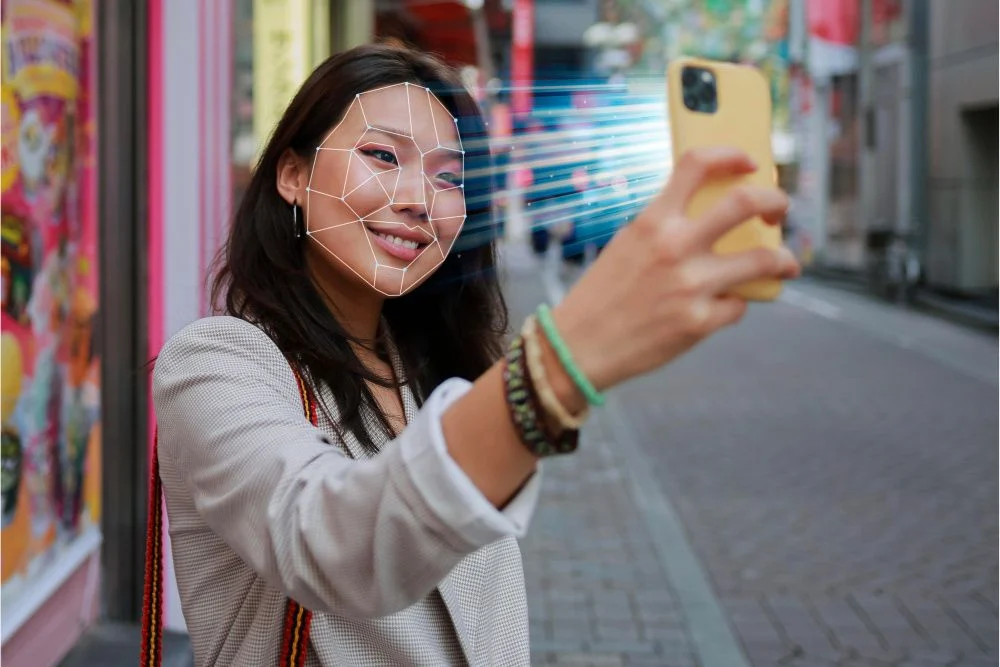
That gap has closed significantly in 2026. And the reason isn’t just better software – it’s the hardware sitting inside modern Android and iPhone devices. Chips like the Snapdragon 8 Gen 3 and Apple’s A17 Pro include dedicated neural processing units built specifically for on-device AI tasks. Face detection, geometry mapping, skin tone analysis – operations that used to require a cloud server to handle quickly can now run partially on the phone itself, which means faster processing and better results even on mobile data connections.
Here’s a number that puts this in context: according to Statista, over 82% of social media content in 2025 was created entirely on smartphones. Developers building AI face swap tools know their users are on phones. They’re building accordingly. And it shows.
Best 5 Mobile AI Face Swap Apps in 2026
SwapyFace – The Best Mobile AI Face Swap App for Smartphone Users
Platform: Android & iOS
Download: Google Play Store & Apple App Store
SwapyFace is the app I sent him while he was still on that metro. And it’s the one I’d recommend first to any smartphone user who needs face swap results that look genuinely professional – without touching a laptop.
Here’s what makes it work specifically well on mobile: the entire workflow is built around phone behavior. You tap to import directly from your camera roll – no file browser, no desktop-style navigation. You tap to process. You tap to share, directly to Instagram, WhatsApp, or wherever you need it. The interface was clearly designed by people who understood that phone users want four taps to a finished result, not fourteen.
But what actually matters is the output quality. And here’s what caught me off guard: SwapyFace runs a preprocessing analysis on both your source and target photos before the swap is applied. The system analyzes facial angle, head tilt, and skin tone, along with the ambient lighting conditions in each image. The system first spatially adjusts the source face and color corrects it to match the target environment before starting the blending process. The additional process produces results that appear contextually accurate rather than showing clear signs of digital insertion.
Features available on the free tier:
- AI photo face swap: selfies, portraits, group shots, celebrity images, meme templates
- Group face swap: auto-detects every face in a photo and processes them simultaneously
- AI gender change: full feature transformation, not a surface filter
- AI meme maker: template library that actually updates with trending formats
- AI image enhancer: sharpens detail and fixes exposure before or after swapping
- AI image restore: recovers clarity from old, blurry, or damaged phone photos
The honest frustrations: The daily credit system, unfortunately, goes by in a flash. After the second swap of each session, you get a watermark impassable in your output unless you buttress your mind with an ad to erase it. Those ads are long – regularly 30 seconds – and they load inconsistently on mobile data. I lost two credits in one sitting because the ad froze mid-play and the credits didn’t return.
Free-tier export resolution is also capped, which matters if you’re planning to print anything. And for social media and digital use, you’re completely fine. For anything that needs enlarging, you’ll need to upgrade.
For AI face-swap on Android and iPhone, SwapyFace is the clear answer for the strongest photo results from a native app.
aifaceswaps.co on Mobile – A Browser Tool That Works Better Than You’d Expect
Platform: Mobile browser – no download, no storage used. Access: Open in Chrome or Safari on your phone – that’s it
I’ll be real with you – I almost didn’t include this in a mobile-focused review. Browser tools on phones are usually a painful experience. Small buttons, awkward layouts, forms that don’t work properly on touchscreens. aifaceswaps.co is a genuine exception. And once I understood what it offers on the free tier, I stopped being surprised that it works on mobile and started being grateful it exists.
Up to 100 photo face swaps per day, zero watermarks, zero account required – accessible from your phone browser right now. That’s the whole case for it as a mobile tool. When SwapyFace credits run out mid-session, you open Safari or Chrome, go to aifaceswaps.co, and keep working. No storage used on your phone. No app to download. Just a browser tab.
The photo output quality holds up on mobile. I ran the same source and target images through both SwapyFace and aifaceswaps.co from my phone. Results were comparable in quality – aifaceswaps.co was slightly ahead on skin tone matching, SwapyFace was slightly ahead on hairline blending.
Honest mobile limitations: The screen size does create friction. Buttons are smaller, image previews are harder to assess precisely on a 6-inch screen, and uploading from the camera roll requires a couple of extra taps compared to a native app. Video processing on mobile data is noticeably slower than on Wi-Fi – if you’re using the free video tier (3 clips per day, up to 10 seconds each), do it on Wi-Fi.
The credit system splits into silver credits – earned free via daily login, covering basic photo tools – and gold credits, which you purchase and need for video, GIF, and batch processing. No refund policy on gold credit purchases, so read the pricing before spending.
As a standalone primary tool on mobile, it’s slightly awkward. As a face swap app backup, when your SwapyFace credits are gone? It’s exactly what you need.
Reface: Best Mobile App for Templates and Viral Content
Reface is the app that made mobile face-swapping mainstream, and in 2026, it’s still the best choice for a specific use case: dropping yourself into pre-made viral content.
Available on both iOS and Android with over 100 million downloads across 90+ countries, Reface’s strength has always been its template library. Its super-fast swaps, animated expressions, and regular content drops make it a sure-fire hit for going viral. Movie scenes, music videos, trending meme formats, dance clips – the library is constantly updated, and the GAN-based rendering engine does a genuinely good job of matching expressions and movement to the template.
The 2025-2026 updates added AI headshot generation, gender-swap filters, AI singing (animate a still photo to lip-sync to a song), and a future baby generator. So it’s grown well beyond a single-purpose face-swap tool into a full mobile content-creation suite.
Free tier reality: The free tier is functional but constantly nudging you toward a subscription – watermarks on outputs, locked templates, and upsell prompts appear regularly. Paid plans start at around $3.99/month.
One important billing warning: multiple reviews from early 2026 describe being charged $19.99/week after what appeared to be a low-cost trial. Always use the annual web plan only, and manage your subscription through your device’s subscription manager rather than by deleting the app.
Privacy note: Reface converts uploaded photos into encrypted “face embeddings” and deletes the original photos within about an hour, but it does collect biometric data and may share it in accordance with applicable laws.
Best for: Casual creators who want to jump into viral trends fast without thinking about setup, meme makers, and anyone who values a huge ready-to-use content library over customization.
FaceMagic: Best Mobile App for TikTok and Short-Form Creators
If Reface is built for memes and viral GIFs, FaceMagic is built for the creator who produces short-form vertical video daily and needs a tool that thinks in the same format they do.
Available on iOS and Android, FaceMagic optimizes the face-swap experience specifically for mobile creators. The application’s design, processing functions, and output configurations are optimized for smartphone displays and the vertical video formats commonly used by TikTok and Instagram users. The app automatically crops and formats content for 9:16 aspect ratios – which saves a step for anyone going straight from swap to upload without any desktop editing.
The swap engine handles expressions and lighting well for a mobile app, producing results that look convincing enough for social content without any manual tweaking. The template library is massive and refreshed regularly, covering movie scenes, meme formats, dance clips, and seasonal trends.
The multi-face feature lets you upload multiple faces – useful for group content and collaborative posts. Music sync and lip-sync with dance moves are also built in, which puts FaceMagic in a slightly different category from apps that only do static or silent video swaps.
Free tier reality: The free version limits you to a limited number of swaps per day, all outputs carry a watermark, and the content library is significantly more restricted than in the paid version. User reviews show mixed results regarding their pricing: long-term users believe it produces good output quality, yet they consider the subscription model overpriced for the services it offers. The paid tier starts at $9.99/month.
Performance note: Testing revealed noticeable performance differences between devices – the iPhone delivered smoother processing and slightly better quality than Android in head-to-head comparisons. Older phones may struggle.
Best for: TikTok and Reels creators who want vertical-first output, music-synced video swaps, and a template library specifically built around trending short-form formats.
Snapchat: Best Free Real-Time Mobile Face Swap App
Snapchat doesn’t get enough credit in dedicated face swap conversations – probably because people associate it with disappearing messages rather than AI tooling. But for real-time, zero-cost face swapping on mobile, nothing beats it.
Snapchat pioneered real-time face swapping and still offers the most polished live face swap experience. The real-time performance is unmatched – Snapchat’s face tracking adapts instantly as you move, making live face swaps feel natural. It’s free and endlessly entertaining.
The face swap lens lets you swap faces with a friend in the same frame in real time, or swap your face with a photo from your camera roll. The AR-powered tracking is smooth enough that expressions and head movements update instantly without the delay you’d expect from cloud processing – because Snapchat does most of it on-device.
With over 375 million active users, the social sharing side of Snapchat is also built in in a way no dedicated face swap app can replicate – you can share a face swap snap directly to Stories, Spotlight, or a friend without any export step.
Free tier: The face swap feature is completely free. Snapchat+ at $3.99/month adds extra features, but the core face swap needs no subscription at all.
Honest limitations: Snapchat’s face swap is a real-time filter, not a precision AI swap tool. Snapchat’s Face Swap Lens lets you swap faces with friends, pets, or even objects instantly using AR filters – it’s fun and easy, but doesn’t offer AI-generated face swaps. If you need a high-quality swap you can save and post elsewhere, one of the other apps on this list will serve you better. Snapchat is for live, in-the-moment fun.
Best for: Anyone who wants instant, zero-cost real-time face swapping with friends – casual users, social media entertainers, people who want face swap for video calls or live content.
Also Read: How to Change Snapchat Emojis?
What Nobody Tells You About Phone Storage, Data, and Battery
A few practical things most face swap reviews skip entirely – because most reviewers are testing on desktops.
- Storage: SwapyFace is a lightweight install. It won’t eat your phone storage the way heavier editing apps do. aifaceswaps.co uses zero storage since it runs in a browser tab.
- Mobile data: AI processing sends your images to external servers. On a strong 4G or 5G connection, this is fast. On weak signal or congested mobile data, processing times increase noticeably. For video processing specifically, use Wi-Fi whenever possible.
- Battery: Running AI face-swap tools does drain battery. A 20-minute editing session on SwapyFace drained roughly 8-10% of my test device’s battery. Not alarming, but worth knowing if you’re already at 30% and nowhere near a charger.
- Best camera tip: For the cleanest results, use photos taken in natural light with a single clear face in the frame. The AI performs noticeably better with high-contrast, well-lit source images than with dark or blurry phone photos.
The Privacy Reality of Using Face Swap Apps on Your Phone
When you upload a photo from your camera roll to any face-swap app or website, that image is sent to an external server. What happens to it is not always clearly disclosed on the main interface.
Some platforms delete your uploaded images immediately after processing. Others retain them for model training purposes. The difference matters – especially if you’re uploading photos of other people without their knowledge or consent.
The legal situation in 2026 is clearer than it used to be. The US NO FAKES Act protects individuals’ likeness rights in AI-generated content. The EU AI Act requires platforms that handle biometric data to follow specific data processing rules. But these laws vary by region, and platform compliance isn’t guaranteed.
Before uploading anyone else’s face for any purpose beyond purely personal use, confirm the platform’s data policy. Get consent from people whose images you’re using. And read the terms of service before paying for any credit package on any platform.
Which App Should You Actually Download?
| Feature | SwapyFace | aifaceswaps.co (mobile browser) |
| Platform type | Native app – Android & iOS | Mobile browser – no install |
| Watermark on free | Yes – from 2nd swap | No – never |
| Free swaps per day | Limited daily credits | Up to 100 photos |
| Video support | Limited to the free tier | 3 clips/day, 10 sec max |
| Storage required | Small app install | Zero – browser only |
| Direct social sharing | Yes – built into the app | Manual download and share |
| Best for | All-round mobile users | Backup tool, storage-conscious users |
- Casual user or complete beginner: SwapyFace. Download it, open it, get results. The simplest path to the best mobile AI face swap output.
- Content creator always on the go: SwapyFace as your primary, aifaceswaps.co open in your browser as backup. Between the two, you’ll almost never run out of free capacity.
- Short-form video creator: Reface or Vidnoz. Better suited to the animated, motion-based output that social video requires.
- Storage-conscious user or someone who hates downloading apps: aifaceswaps.co in your mobile browser. A hundred watermark-free swaps a day with nothing installed on your phone is a genuinely excellent deal.
Also Read: Best AI Image Generation Software
Where Mobile Face Swap Goes From Here – My Honest Take
What surprised me most throughout this entire testing process wasn’t any single feature. It was how phone-native the experience has become. Two years ago, doing this kind of AI editing on a phone felt like a compromise. You’d do it because you had no choice, even though you knew the desktop version would be better.
That’s no longer the case – at least for photo work. The best mobile AI face swap app options in 2026 are producing results on phones that don’t need to apologize for not being desktop tools.
He got his photo sorted before his train reached the next stop. He shared it on his store page while still on the metro. That’s the real benchmark – and SwapyFace cleared it without any trouble.
What is your most annoying experience when using AI editing apps on your mobile phone? I want to know whether users pay for premium plans because of the credit and watermark systems, or whether they can continue using the free tiers. Please share your experience by writing in the comments section.
Add SocialAtoZ as a preferred source
See us more often in your Google results.