Clipfly AI
VerifiedYour everyday AI video & image toolkit
 See all screenshots
 - Deployment Cloud Based
- Starting price 10.99/Month
- Free trial Available
- Best for Freelancers, Startups, SMEs
What is Clipfly AI?
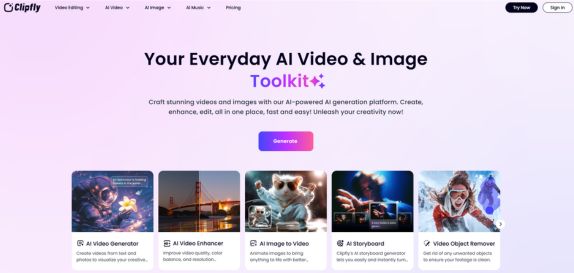
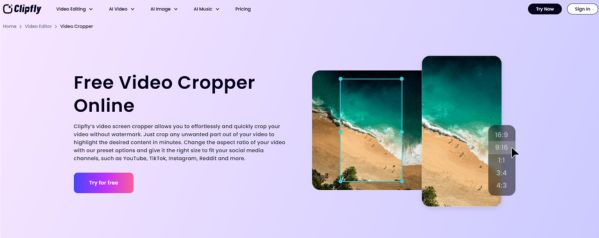
Clipfly AI is an all-in-one AI video and image creation platform built for creators, marketers, businesses, and everyday users who want fast, polished content without advanced editing skills. With Clipfly AI, you can generate videos from text or images, enhance blurry footage, remove unwanted objects, edit audio, create AI images, and even generate AI music in one place. Its biggest value is convenience: instead of switching between multiple tools, users can create, enhance, and edit visual content inside a single web-based toolkit. Clipfly AI is especially useful for social media creators, small businesses, content marketers, and anyone making promo videos, slideshows, avatars, or fun AI effects. It also supports practical editing tasks such as trimming, cropping, merging, adding subtitles, applying transitions, and changing backgrounds, making it a flexible choice for both creative projects and everyday production work. If you want a beginner-friendly platform that combines AI generation with editing utilities, Cliply AI delivers an accessible, feature-rich solution.
Key Features of Clipfly AI
Clipfly AI lists 6 documented features, including AI Video Generation, AI Video Enhancement and Video Editing Tools. The list below covers what the product does rather than how it is marketed.
- AI Video Generation
- AI Video Enhancement
- Video Editing Tools
- AI Video Effects
- AI Image Creation & Editing
- AI Music & Audio Tools
Clipfly AI Pricing
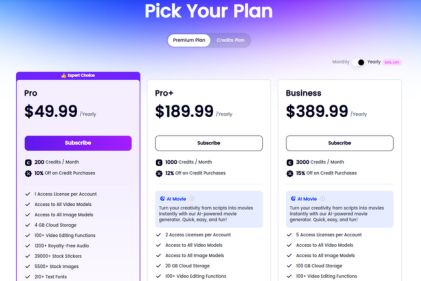
Clipfly AI lists 3 plans, from $10.99 to $87.99.
Pro Plan
10.99/Month
What’s included:
- 200 Credits/Month
- 1 Access License per Account
- Access to All Video Models
- Access to All Image Models
- 4 GB Cloud Storage
- 100+ Video Editing Functions
- 1200+ Royalty-Free Audio
- 39000+ Stock Stickers
- 5500+ Stock Images
- 210+ Text Fonts
- Export Video as GIF at 640p
Pro+ Plan
39.99/Month
What’s included:
- 1000 Credits/Month
- 2 Access Licenses per Account
- Access to All Video Models
- Access to All Image Models
- 20 GB Cloud Storage
- 100+ Video Editing Functions
- 1200+ Royalty-Free Audio
- 39000+ Stock Stickers
- 5500+ Stock Images
- 210+ Text Fonts
- Export Video as GIF at 640p
Business Plan
87.99/Month
What’s included:
- 3000 Credits/Month
- 5 Access Licenses per Account
- Access to All Video Models
- Access to All Image Models
- 100 GB Cloud Storage
- 100+ Video Editing Functions
- 1200+ Royalty-Free Audio
- 39000+ Stock Stickers
- 5500+ Stock Images
- 210+ Text Fonts
- Export Video as GIF at 640p
Clipfly AI Specifications
Clipfly AI is available on web app, Windows and macOS and has iOS, Android and macOS apps. It offers an API, has a free trial and has a free plan.
- Deployment
- Cloud Based
- Billing cycle
- Yearly
- Desktop
- Web App
- Windows
- macOS
- Mobile
- iOS
- Android
- macOS
- Languages
- En-us
- Built for
- Freelancers
- Startups
- SMEs
- Agencies
- Enterprises
- Support
- Training
- Tickets
- Integrations
- YouTube, TikTok, Instagram, Facebook, AI models integrated include Veo 3, Flux, Nano Banana, Seedream, and Qwen.
- Public API
- Yes
- Free trial
- Yes
- Free plan
- Yes
- Runs in browser
- Yes
- Customisable
- Yes
- Website
- clipfly.ai
Clipfly AI Videos
Clipfly AI Screenshots
Clipfly AI Comparisons
Side by side comparisons of Clipfly AI against 3 other AI Audio Enhancer Tool options listed here.



Clipfly AI Reviews
No reviews yet
Used Clipfly AI? Share your experience and help other buyers decide.
Clipfly AI FAQs
Alternatives to Clipfly AI
Other AI Audio Enhancer Tool recorded on the same fields.