What is Dzine AI?

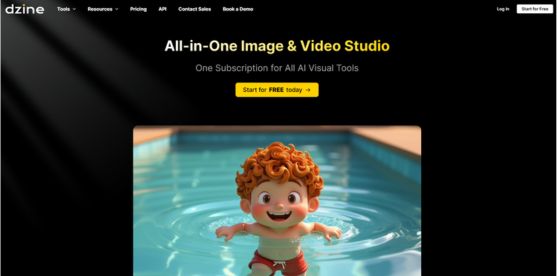
Dzine AI is an all-in-one AI image and video studio built for creators, designers, marketers, and teams that want more control than typical text-to-image tools provide. Instead of relying only on prompt writing, Dzine AI combines layer-based composition, drag-and-drop positioning, sketching tools, predefined styles, and conversational prompt assistance to help users create polished visuals faster. It is especially valuable for beginners who want a simple interface, as well as professionals who need accurate edits, consistent characters, image enhancement, generative fill, background changes, and high-resolution exports. The platform also extends beyond image creation to include AI video generation, lip-syncing, talking avatars, and image-to-video workflows, making it useful for content production, ads, social media, and storytelling. With free credits, a free trial, and support for multiple languages, Dzine AI positions itself as a practical, user-friendly alternative to more technical AI art tools while still offering advanced creative control.

Key Features of Dzine AI

Here are the powerful features that make Dzine AI stand out from the competition. Packed with innovative tools and advanced functionalities, this software offers a range of benefits.

  • AI Image Generation & Editing
  • Composition & Layer Control
  • Style & Prompt Assistance
  • Enhancement & Cleanup Tools
  • Video & Lip Sync
  • Creative Effects & Filters
  • Model Support

Dzine AI Pricing

Here are the pricing plans for Dzine AI. Choose the plan that best fits your requirements and budget.

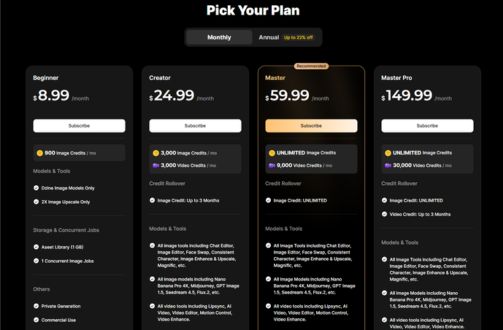
Beginner Plan

$ 8.99/month

What’s included:

  • 900-1,000 Image Credits/month
  • Dzine image models only
  • 2x Image Upscale only
  • 1 GB asset library
  • 2 concurrent image jobs
  • No video credits
  • Private generation
  • Commercial use

Creator Plan

$ 24.99/month

What’s included:

  • 3,000 Image Credits/month
  • 3,000 Video Credits/month
  • Image credit rollover
  • All image tools
  • All image models
  • All video tools
  • All video models
  • Multi-Character Lipsync
  • Up to 2x Video Enhance
  • Up to 1080p Video Upscale
  • 10 GB asset library
  • Store 10 private characters & 10 Pro Styles
  • 5 concurrent image jobs / 3 concurrent video jobs
  • Private generation
  • Commercial use

Master Plan

$ 59.99/month

What’s included:

  • UNLIMITED Image Credits
  • 9,000 Video Credits/month
  • Image credit rollover: Unlimited
  • All image & video tools (same as Creator)
  • All image & video models (same as Creator)
  • Multi-Character Lipsync
  • Up to 4x Video Enhance
  • Up to 8K Video Upscale
  • Unlimited access to: Nano Banana Pro 2K/4K, Seedream 3.0/4.0/4.5, Midjourney, ChatGPT, Flux.2 Flex & Pro, Google Imagen 4, Qwen Image
  • 100 GB asset library
  • Store 60 private characters & 60 Pro Styles
  • 12 concurrent image jobs / 3 concurrent video jobs
  • Private generation
  • Commercial use

Master Pro Plan

$ 149.99/month

What’s included:

  • UNLIMITED Image Credits
  • 30,000 Video Credits/month
  • Image & Video credit rollover
  • All image & video tools and models
  • Multi-Character Lipsync
  • Up to 4x Video Enhance
  • Up to 8K Video Upscale
  • All unlimited image models (same as Master)
  • 200 GB asset library
  • Store 120 private characters & 120 Pro Styles
  • 12 concurrent image jobs / 6 concurrent video jobs
  • Private generation
  • Commercial use

Dzine AI Specifications

Get a closer look at the technical specifications and system requirements for Dzine AI. Find out if it's compatible with your operating system and other software.

Software Tagline :
All-in-One Image & Video Studio
Deployment :
  • cloud based
Subscription Plan :
monthly
Desktop Platforms :
  • web app
Mobile Platforms :
Language Support :
en-US
Target Audience :
  • freelancers
  • startups
  • smes
  • agencies
Available Support :
  • email
  • tickets
Integrations :
Text-to-Image, Image-to-Image, and Face Swap
Product Url :
API Available :
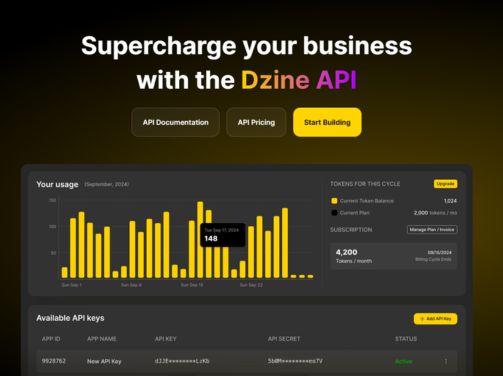
Yes
Free Trial Available :
Yes
Run On Mobile Browser :
Yes
Free Plan Available :
Yes
Customization Available :
Yes

Dzine AI Videos

Dzine AI Screenshots

Alternatives

Explore alternative software options that can fulfill similar requirements as Dzine AI. Evaluate their features, pricing, and user feedback to find the perfect fit for your needs.

Dzine AI Comparisons

Compare Dzine AI with other similar options available. Explore the key differences to see why it's the top choice for businesses and individuals.

Overall Dzine AI Reviews

Here's our unbiased review of Dzine AI. Discover how our team of experts rates its features, ease of use, customer support, and other aspects that contribute to its overall appeal.

0/5

Based on 0 Reviews

0

Feature

Out of 5

0

Ease of use

Out of 5

0

Value for money

Out of 5

0

Customer support

Out of 5

0

Overall Rating

Out of 5

Dzine AI Pros and Cons

Dzine AI FAQs

dzine ai is used for AI-powered image creation, image editing, and video generation. It helps users produce visual content with more control through layers, styles, enhancement tools, and conversational prompt assistance.

Yes. dzine ai is designed with a user-friendly interface and predefined styles, so beginners do not need advanced prompt-writing skills. The built-in assistant can help generate prompts, and the canvas tools make editing easier.

Yes. dzine ai offers a 7-day free trial, 100 free credits at signup, and daily refreshed free credits. This makes it possible to test the platform before upgrading to a paid plan.

dzine ai stands out because it focuses on composition control, layered editing, and practical design workflows instead of only prompt-based generation. It also includes enhancement, cutout, and video tools, which makes it more versatile than many single-purpose generators.

Yes. In addition to image generation and editing, dzine ai includes AI video tools such as text-to-video, image-to-video, video-to-video, talking avatars, and lip sync generators. This makes it a broader creative suite for content production.