Managing social media well takes a scheduler, a way to listen to what people say, a place to make visuals and a system to track tasks. No single tool does all four equally well, so this list of 15 tools is grouped by job.
The short version: pick a scheduler first (Agorapulse, Metricool or Hootsuite), then add listening, design or influencer tools only when a real gap shows up.
Whether you work in a marketing department, freelance or run your own business, these programs cover the main parts of managing your social media. For software at scale, browse the social media management software directory. Placement here isn’t paid.
- Tools for scheduling and posting on social media.
- Tools to manage social Media: identify, analyze, and grow your audience.
- Social Media tools for creating and editing images.
- Tools to manage social media with influencers.
- Tools for everyday tasks.
Tools for Scheduling and Posting on Social Media
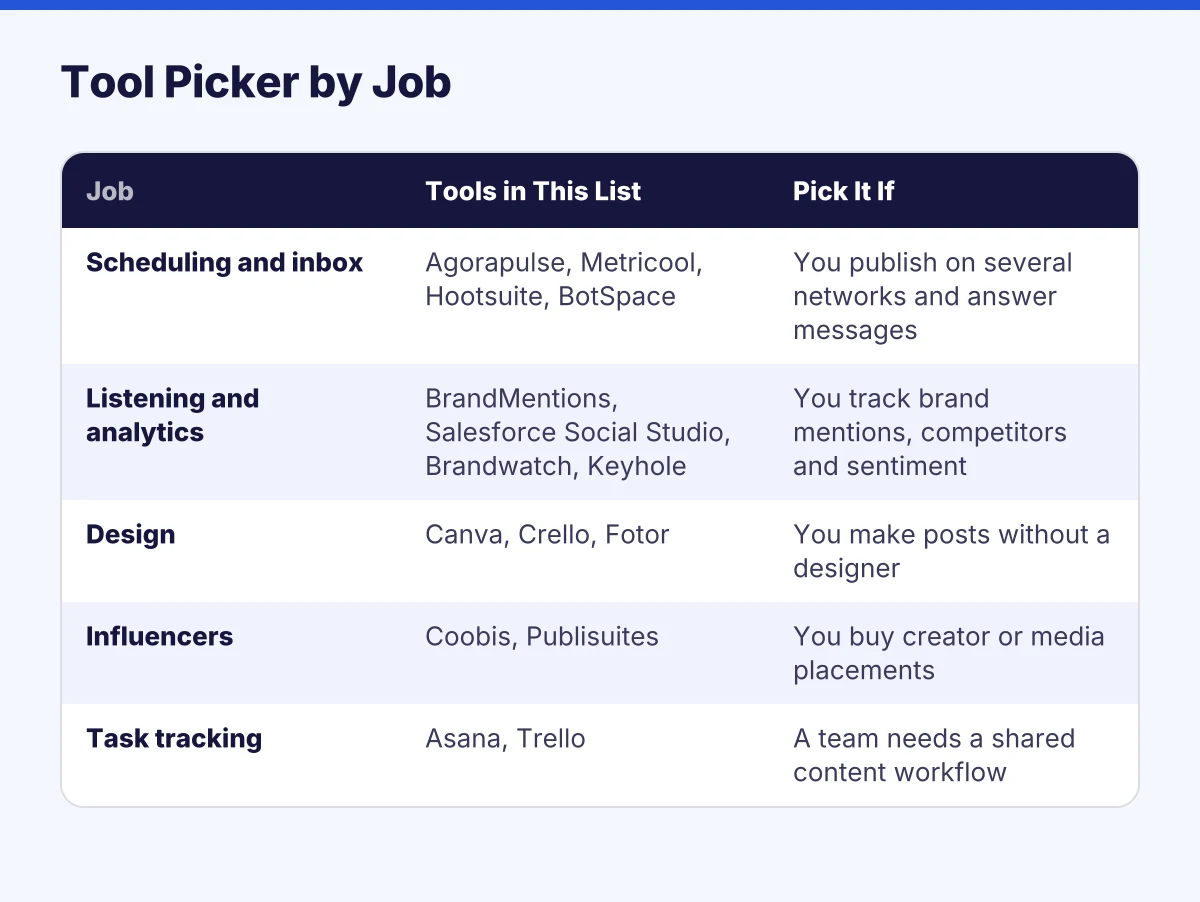
Which tool fits which job?
| Job | Tools in this list | Pick it if |
|---|---|---|
| Scheduling and inbox | Agorapulse, Metricool, Hootsuite, BotSpace | You publish on several networks and answer messages |
| Listening and analytics | BrandMentions, Salesforce Social Studio, Brandwatch, Keyhole | You track brand mentions, competitors and sentiment |
| Design | Canva, Crello, Fotor | You make posts without a designer |
| Influencers | Coobis, Publisuites | You buy creator or media placements |
| Task tracking | Asana, Trello | A team needs a shared content workflow |
Start with the job that costs you the most hours. Skip enterprise listening suites until you have a team that acts on the data.
Before you invest in another monthly license or subscribe to yet another tool, it’s worth auditing your current stack. With SavingTool, you can identify underused subscriptions and redirect those savings into tools that actually boost your social strategy.
Take advantage of software designed to help you schedule all the posts you want to share across your networks, even if you have multiple channels. So, you can plan and manage your strategy beforehand to focus on connecting with your community and growing your business.
AgoraPulse
Agorapulse is ideal for organizing and managing posts, responding to messages, and creating detailed reports.
- It allows you to plan, collaborate on, and schedule the content in your social media marketing plan.
- It has software that helps optimize your posts to maximize their performance on each social network.
- The release schedule is visually appealing and easy to understand, so you can stay on top of your strategy’s progress. Likewise, it is possible to reschedule content so that it is visible to new audiences at different times.
- It has a mobile application so you can schedule your content from anywhere.
- The tool groups all the conversations that are happening on your social media in one place. In this way, you make sure to respond to each message, comment, or review in record time to improve your relationship with your audience and not lose the opportunity to win a potential client.
- The publications can be adapted to the format of each social media platform you manage. You will be able to follow the interactions that occur within your social network.
- In addition to helping you schedule and publish content, this tool is used to manage your social media, create sweepstakes, contests or activities that boost engagement with your followers.
- It supports YouTube, Instagram, Facebook, LinkedIn, and Twitter.
- Agorapulse is one of the best social media management tools for metrics and analytics. It includes statistical studies that, in addition to helping you understand your audience, provide insights into the best day and time to publish based on your followers, identify the most effective content, and measure the reach of your publications, among others.
- Pricing changes often, so check the Agorapulse pricing page for the current free trial and starting price.
Metricool
Another social media management tool you cannot miss is Metricool. On the same platform, you can plan, manage, create ads, monitor, and get reports.
Its list of products includes: analytics, planning, competitor analysis, SmartLinks, Inbox, real-time, announcements, reports, data studio, and Chrome extensions.
Regarding the planning service, this software is used to manage social media:
- It works across various networks, including Twitter, Facebook, Instagram, LinkedIn, Twitch, TikTok, YouTube, and blogs.
- It allows you to build a simple and visual editorial calendar. The calendar helps you schedule posts at the best times. You can filter the calendar by social network, preview posts before uploading, and import your CSV schedule to the calendar with one click.
- It has the potential to automate content to keep social media active and avoid losing engagement with your audience. You can easily establish the periodicity and save time.
- The social media management tool offers multiposting. This allows you to effortlessly publish the same content across multiple platforms. Before publishing them, you get a preview.
- Analyze audience behavior to identify the best posting times for your audience.
- It has the SmartLinks service: direct links that take people from your various social media accounts to your website via a microsite.
- It helps monitor the overall status of content published across all networks in a single panel.
- Shows a summary of the performance of each social network, such as reach, impressions, likes, and comments.
- There is a free version, and paid plans are available. Check Metricool’s pricing page for current prices.
Hootsuite
If you work as a community manager or are in charge of multiple social network accounts, you will make this social network management tool your ally daily, since it allows you to manage up to 20 social media accounts in a single dashboard.
Hootsuite is a simple-to-use platform with many features, all designed to make managing social media as easy and efficient as possible.
- Thanks to its automatic scheduling function, you can schedule posts across all social media with a couple of clicks.
- The calendar design allows you to easily consult the publications.
- You can create content and share it on different social channels.
- It allows you to monitor all posts and messages from followers in one place. So you can respond as quickly as possible and even share the feedback with your team.
- The social media management tool allows you to plan upcoming campaigns, view scheduled content, and collaborate in real time with the team.
- The monitoring service helps create more effective campaigns by recommending the best times to post content based on your social profiles’ users.
- It helps to analyze the results and create reports to understand the impact of shared content.
- One of the most outstanding features of Hootsuite is its dashboards, where you can monitor by custom columns depending on what you want to view. For example, feed from Instagram, Twitter mentions, hashtags, or monitoring the competition.
- It has an App for mobile devices.
- It integrates with more than 150 apps, including Trello and Slack.
- It has courses and certificates so you can get the most out of the tool.
- Hootsuite sells tiered plans, including a Professional plan for multiple accounts. Check Hootsuite’s pricing page for current plans and prices.
Also Read: Best Social Media Monitoring Tools & Why You Need Them
BotSpace
BotSpace is a customer engagement platform designed for businesses looking to automate conversations and drive growth. But it also offers robust social media automation features for Instagram. With BotSpace, you can quickly respond to direct messages (DMs), comments, story mentions, and ads, making it easier to capture leads, boost engagement, and strengthen connections with your audience.
Key Features:
- Centralizes all Instagram DMs and comments into a single inbox, ensuring you never miss a conversation.
- Automates common workflows, such as sending product links, coupons, webinar sign-ups, and follow-ups directly in chat.
- Provides ready-to-use templates that allow you to launch Instagram campaigns in minutes, without needing coding skills.
- Powered by an AI agent that manages your social media 24/7, engaging customers, answering FAQs, and capturing leads while you sleep.
- Includes a mobile app for managing chats and automations on the go.
Tools to Manage Social Media: Identify, Analyze, and Grow Your Audience
For your social media strategy to be truly effective, you must constantly monitor what is happening with your brand, your competitors, and global trends.
So you can make sure you are generating valuable content at the right time. Fortunately, you have tools for managing social media that precisely help you monitor everything that happens so that you can make the best decisions. To further enhance reach and engagement, businesses can also use a social signals service to boost interactions like shares, likes, and comments across platforms.
BrandMentions
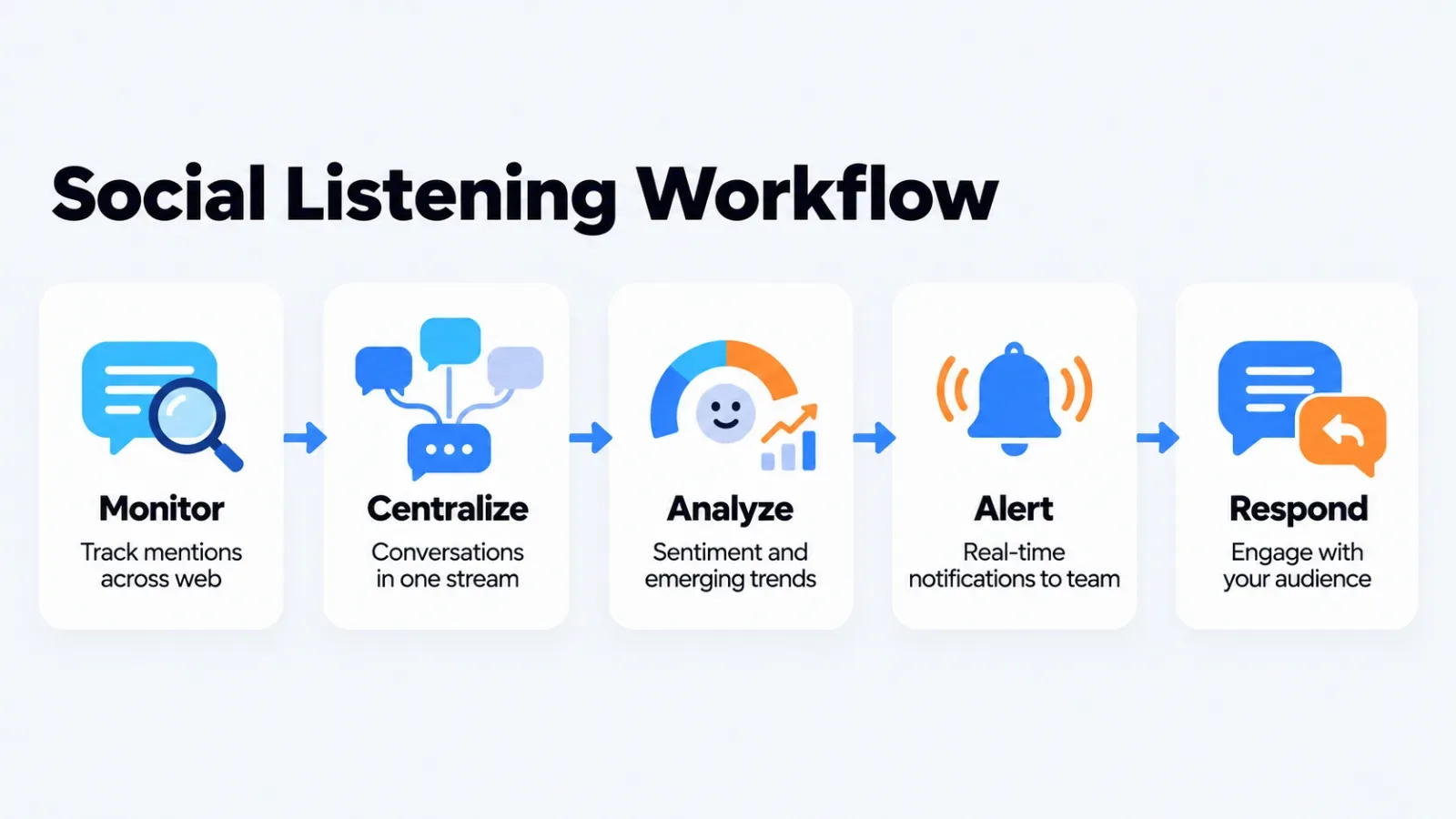
BrandMentions is a specialized tool for social listening and real-time engagement, designed to help you “track and engage” in every conversation about your brand as it happens. While other tools focus on your own profiles, BrandMentions finds mentions across the entire web, allowing you to participate in discussions you didn’t even know were happening.
With BrandMentions, you can:
- Centralize all conversations in one place. Whether it’s a comment on Instagram, a thread on Reddit, or a review on a niche blog, the tool pulls them into a single stream so you never miss a beat.
- Respond on the spot. You can engage with customers, influencers, or critics the moment they mention your name, allowing for instant customer support and crisis management.
- Perform deep social monitoring across Facebook, Instagram, X (Twitter), LinkedIn, YouTube, and TikTok. It also scans the “unseen” web, including forums like Quora and news sites, giving you a 360-degree view of your social presence.
- Automate your workflow with real-time alerts. You can set up notifications to hit your inbox or Slack immediately, so you can jump into a viral conversation before the opportunity passes.
- Use AI-Sentiment Analysis to prioritize your responses. The tool automatically flags negative mentions so you can address complaints first, effectively “putting out fires” before they scale into a PR crisis.
- Connect with influencers who are already talking about your niche. By seeing who mentions your brand most frequently, you can build relationships on the spot and turn casual mentions into official partnerships.
- Spy on competitor interactions. You can monitor the conversations happening on your rivals’ pages and step in when their customers express dissatisfaction, a strategy known as “social selling.”
BrandMentions suits teams focused on community management and reputation protection. It offers a free 7-day trial; check its pricing page for current plan prices.
Salesforce Social Studio
Social Studio was a Salesforce tool for analyzing social data and posts. Salesforce has retired it, so check Salesforce’s official announcements before considering it.
- Its listening feature collects conversations from a very large number of sources; check the vendor’s site for the current source count.
- Social Studio helps you respond to your customers as quickly as possible by giving them engaging content. In addition, it has technology to measure users’ feelings, an element that helps identify the general emotion associated with your brand.
- It helps organize information by discussion and topic, allowing the work team to respond more efficiently.
- Social posts can be redirected to the CRM platform to provide a more detailed view of the customer.
Brandwatch
Brandwatch is a strong pick for social listening, mostly for larger teams that can act on the data.
Brandwatch is a leading social listening platform for consumer opinion and trend research, with large historical and real-time data sets. Check Brandwatch’s site for current data volumes.
- Collect millions of posts, comments, conversations, videos, and hashtags that are relevant to your brand.
- It has Image Insight, an AI technology that can read a company logo even without the name being mentioned.
- Being able to identify emerging trends helps you make smart, accurate decisions. Likewise, it gives you the opportunity to find new market opportunities.
- You can improve your ROI. By focusing your social media actions and strategies on solid data and insights, you will have a competitive advantage over your competitors.
- Protect your brand from a threat or image crisis.
- Accounts with notifications with parameters defined according to the needs.
- The results and reports can be classified by type, such as complaints, feedback, opinions, etc.
- The web platform has several trend analysis reports from different sectors, so that you always know your audience.
Keyhole
If you are looking to make your life easy when it comes to publishing and analyzing your strategies, this social media management tool is your solution. Keyhole offers a variety of services, including social listening, post scheduling, and monitoring and reporting for brands, influencers, and campaigns. All from the same platform.
These are some of the most outstanding features of this page to manage social media:
- It allows you to manage multiple accounts in one place, simplifying the process.
- It has tools that provide insights, so you know how to optimize each post and maximize its impact.
- It has a calendar so you can visualize the entire social media strategy. You can program your entire strategy in advance to be on top of each step. Likewise, you can go back months to see what they have done.
- The platform is ideal for you to collaborate with your entire team without losing information when sending emails. Everyone can work on strategy and content from the platform. Likewise, clients can access the posts before they are published.
- With its social listening tool, you can learn more about your consumers: what they talk about, who they are, what they like, what they share, and what they say about you.
- With Keyhole recommendations, you have relevant information, such as the best times to post and which hashtags to use.
- It includes an influencer analysis service, so you know which influencers are most compatible with your brand.
- You have access to all the direct and indirect messages of your brand, hashtags, influencers, and keywords. In this way, you can connect with your audience more effectively.
- It has AI-based sentiment analysis to understand how your followers feel about you and your competitors.
- Automate social media reports to save hours and avoid errors. In addition, measure the impact of your campaigns and events and identify which trends are delivering the best results, providing data on the activities generating the most consumer relationships.
- Compare the performance of your brand’s networks and those of the competition. In addition, it helps you understand the competition’s content and strategy to see what works for them.
- Reports are done in seconds and in formats with easy-to-understand layouts. They can be downloaded in XLS and PDF formats.
Social Media Tools for Creating and Editing Images
Managing social media starts with creating the pieces. Therefore, keep these tools focused on helping you design your pieces and videos so that they do not go unnoticed by your audience.
Canva
Canva has become very popular for designing all kinds of pieces. Now you can create all the posts for different social media or reports that generate impact.
- The platform has a huge variety of predesigned templates that can be found by color, theme, industry, or by type of use: Social media posts, blog headers, Instagram stories, videos, video infographics, posters, invitations, among others.
- You can choose from thousands of graphics, icons, fonts, and images, or easily incorporate your brand colors and logos.
- You can animate all your designs to make them even more attractive.
- Their software is very easy to understand and use, so everyone can feel like a designer.
- Allows you to add people to the project so that your team is aligned.
- Canva has a free version and paid plans, including Canva Business. Check Canva’s pricing page for current prices.
Crello
Crello was a template-based design tool, now rebranded as VistaCreate.
It offers a large library of templates across many formats.
- You don’t have to worry about the dimensions of different platforms; this social media management tool does the work for you.
- Easy and intuitive to use.
- Formats that stand out are: Posts and Stories, Covers and Headlines, Online Ads, Marketing, and Videos and Animations.
- It offers graphic and video formats for all social media platforms like Facebook, Instagram, Twitter, Pinterest, TikTok, Twitch, Snapchat, and YouTube, as well as banners for e-commerce pages like eBay and templates for email marketing.
- Help create logos.
- You have a library of creative resources: stock photos, videos, animations, and illustrations for your pieces.
- It has tutorials in case you need tips to get the most out of the tool.
- A free plan and a paid plan are available; check the official pricing page for current prices.
Fotor
The last tool for managing social media, focused on designing the pieces, is Fotor. This platform focuses, above all, on helping you edit photos with just a couple of clicks. Before publishing edited photos, it’s smart to run a reverse image search to confirm you’re not accidentally reusing someone else’s copyrighted image.
It has more than 100,000 templates in every imaginable format, so you can design your social media pieces, ads, or marketing presentations.
- It is available in 9 languages.
- Allows you to crop or resize an image.
- Smart technology that helps you remove backgrounds from images with a couple of clicks.
- It has all the tools you need to edit and enhance your photos aesthetically.
- If your photos include people, you can eliminate one or another skin imperfection.
- Add effects to photos to give them a unique touch and make them stand out even more.
- You can use it from your computer or cell phone. Although the most complete tools are in a PC version.
- Endless tutorials to inspire you and improve your photo editing skills.
- It is free, but it offers paid plans if you want an even more professional touch.
Also Read: Best Configuration Management Software
Tools to Manage Your Social Media with Influencers
Social media plays by its own rules, where users and content rule. For this reason, it is often easier to go where your potential customers are than to build your community from scratch.
This is the power that influencers and relevant media have. An influencer marketing platform like Influencer Hero can make it easier to find, connect with, and manage the right creators for your brand. Keep in mind these tools that help you boost your social media by finding the perfect influencers.
Coobies
Coobis is an influencer and branded-content platform. It has cited working with a large number of companies; check Coobis’s own site for current figures.
- The interface is easy to understand and very intuitive. It allows you to filter the rankings of media and influencers by factors such as Authority, number of social media followers, country, web traffic, and specific topics.
- You can monitor the impact using specific metrics.
- It is a perfect tool for brands, media, and influencers looking to create content campaigns.
- Its services are focused on: Branded content, to improve brand recognition and increase web traffic through strategies like digital marketing guest post that help expand audience reach; influencers, to better connect with your audience; and SEO, to better position in search engines.
- They have more than 30,000 media, websites, and influencers, so you can create exclusive and relevant content for your brand, such as sponsored articles, mentions on social media, and video appearances, among other actions.
Publicsuites
Publisuites is a platform that aims to make life easier for those looking to grow their business and stand out online. In 40 countries, they facilitate relationships between brands and companies and relevant media, editors, and influencers.
- They are in charge of finding the media, editors, or specific influencers for your brand. Thus, you can focus that time on other tasks.
- On one platform, you can buy sponsored content and posts on blogs and in the press, as well as collaborations with influencers.
- You have the help of an SEO specialist, who helps manage all the content you publish so that it is more visible in search engines.
- The platform has cited a large network of specialized media, influencers and editors; check Publisuites’s own site for current figures.
- You have access to the academy of this digital management tool, where you can find free courses and guides to further enhance the strategies.
Tools for Everyday Tasks
Managing social media strategies is not easy, especially in a digital space where everything has to happen at the speed of light. For this reason, some of the tools for managing social media involve planning and organizing specific activities. Using project management systems can greatly improve how teams coordinate content calendars, assign responsibilities, and track progress across platforms.
These tools will help you to make your work more fluid and collaborative, and ensure that each task is completed on time. You can put an end to the eternal threads of emails or lost information.
Asana
Whether you work alone or have a large team, Asana is the ideal tool to manage all your social media projects.
- Allows you to share the project with the whole team.
- Its interface is highly visual, making it easy to understand and use.
- It has calendars, task assignment, activity tracking, and notifications.
- The scheduler categorizes tasks that are pending, in progress, or finished, so everyone knows what your social media campaigns are about. Likewise, it monitors finances and expenses.
- Helps identify friction points and bottlenecks so all members can get their tasks done.
- Improves communication within the team, since everyone has a complete picture of the project and the process each person is involved in.
- Asana has a free tier and paid plans. Check Asana’s pricing page for current prices.
Trello
Trello is well-known and widely used to unify the team’s efforts, manage projects, assign tasks, and track each person’s actions. creating boards and customizing workflows depending on your needs: meetings, brainstorming, projects, events, or goals.
- Allows you to assign tasks to know who is responsible for each part of the work.
- It is very friendly to use.
- All users can include notes on topics, improvements, or progress.
- You can set pending and delivery times so that everything flows more efficiently.
- You can divide the activities into 3 columns: to do, in progress, and completed. In addition to maintaining order, it helps build a sense of accomplishment in the team by seeing multiple tasks completed.
- You can generate notices for tasks that are about to expire. In this way, project delays are reduced.
- It allows linking with more applications.
- It has a free or paid version.
Also Read: Best Tools For Instagram to Boost Your Social Strategy
Choosing a stack
Pick one scheduler, one task board and one design tool, then add listening only if mentions affect sales or support. For related reading, see the social media customer support tools guide and the social media strategy checklist.
All-in-one marketing platforms can replace several of these tools, but they usually trade depth for breadth. Check what your team will actually use before paying for it.
Frequently asked questions
What is the best tool to manage social media?
It depends on the job. Agorapulse, Metricool and Hootsuite are the usual starting points for scheduling and inbox management, while Brandwatch and BrandMentions serve listening.
Is there a free social media management tool?
Metricool, Canva, Asana and Trello have all offered free tiers. Limits change, so check each vendor’s pricing page.
Do I need a separate listening tool?
Not at first. Schedulers cover basic mentions and messages. Add a listening tool when you need web-wide mentions, sentiment or competitor tracking.
How many tools does a small team need?
Usually three: a scheduler, a design tool and a task board. Add more only when a specific gap costs you time.
Where can I read about monitoring tools?
See our guide to social media monitoring tools for more on tracking mentions.
Add SocialAtoZ as a preferred source
See us more often in your Google results.