 See all screenshots
 - Deployment Cloud Based
- Starting price Free tier available
- Free trial Available
- Best for Individuals, Freelancers, Small Business
What is Opus Clip?
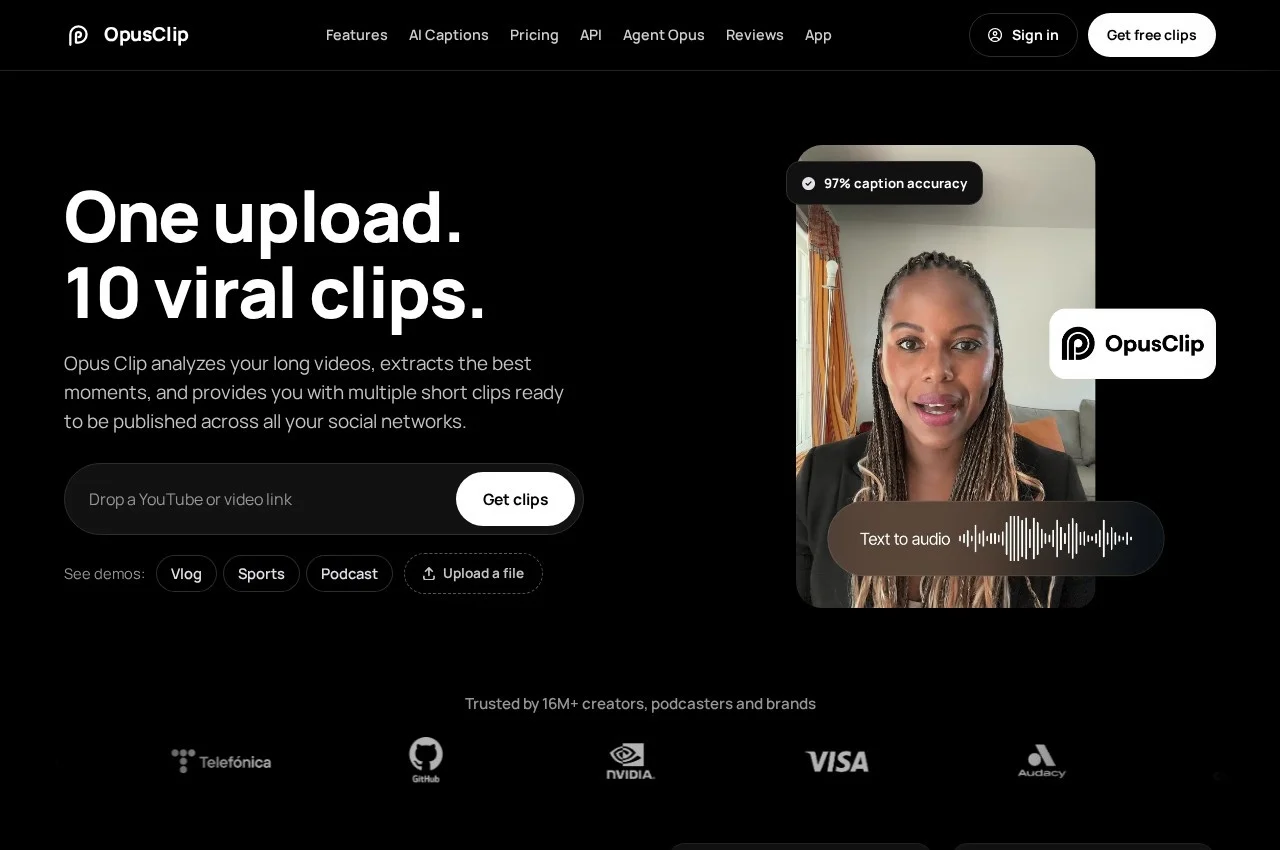
Opus Clip takes a long recording and extracts the segments most likely to hold attention, returning a batch of short clips ready to post. The vendor's framing is that a long video already contains around ten viral clips and the work is finding them, so the product reads every frame rather than only the transcript. Each clip comes back trimmed, reframed vertically and captioned, with an opening line built to stop a scroll.
Two things separate it from a basic trimmer. Clips arrive ranked by a Virality Score rather than in timeline order, so a creator works down a prioritised list instead of reviewing everything. And ClipAnything handles genres beyond talking heads, covering vlogs, gameplay, sports and explainers, with the option to describe the moment you want so the tool goes and finds it. That matters because most tools in this category stall on anything that is not an interview.
Captions land automatically in more than 20 languages with emoji and keyword accents, and can be restyled with a preset, your own font, or line-by-line edits. Audio gets speech enhancement to strip room noise and even levels, and an AI voice over can read a fresh hook. Footage can be pulled in from YouTube, Drive, Zoom, Vimeo, Loom and more than ten other sources. Brand templates lock fonts, colours, logos and intro and outro cards across every clip, a team workspace covers seats and roles, and a video editing API allows the whole process to run inside another system.
Key Features of Opus Clip
- Automatic extraction of multiple short clips from one long video
- Frame-level analysis rather than transcript-only selection
- Virality Score ranking so clips arrive prioritised
- ClipAnything covering vlogs, gameplay, sports and explainers, not only talking heads
- Describe a moment in words and have the tool locate it
- Automatic vertical reframing for social formats
- AI captions in more than 20 languages with emoji and keyword accents
- Caption restyling by preset, custom font or line-by-line editing
- Speech enhancement removing room noise and levelling audio
- AI voice over for recording a fresh hook
- Footage import from YouTube, Drive, Zoom, Vimeo, Loom and other sources
- Brand templates locking fonts, colours, logos and intro and outro cards
- Team workspace with seats and roles
- Social scheduling to Shorts, TikTok and Reels
- Filler and silence removal
- Video editing API for running the workflow inside your own stack
Opus Clip Pricing
Free
Free tier available
A free plan with a monthly credit allowance, clips rendered up to 1080p, automatic vertical reframe and AI captions. Clips carry a watermark and editing is reserved for paid plans.
Paid tiers
Quoted on the vendor site
Paid tiers raise the monthly credit allowance and add the full editor, Virality Score, captions in over 20 languages, social scheduling, brand templates, team workspace, aspect ratio options and export to Premiere or DaVinci. Figures appear on the vendor homepage but its pricing URL redirects to a login, so they could not be verified here.
Opus Clip Specifications
- Deployment
- Cloud Based
- Desktop
- Web App
- Built for
- Individuals
- Freelancers
- Small Business
- Support
- Public API
- Yes
- Free trial
- Yes
- Free plan
- Yes
- Runs in browser
- No
- Customisable
- No
- Website
- opus.pro
Opus Clip Screenshots
Opus Clip Comparisons



Used Opus Clip? Write the first review.
Alternatives to Opus Clip
Other AI Video Editing recorded on the same fields.