Recraft AI
VerifiedThe creator’s platform for generating and editing images, vectors, and mockups with AI.
 See all screenshots
 - Deployment Cloud Based
- Starting price 0/month
- Free trial Available
- Best for Freelancers, Startups, SMEs
What is Recraft AI?
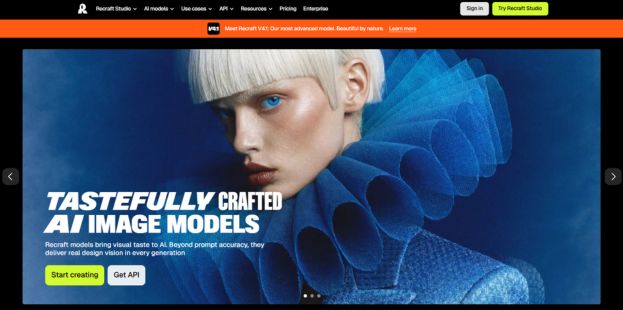
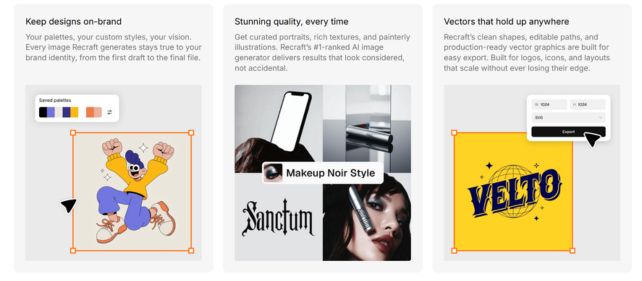
Recraft AI is an AI-powered design platform built for creating professional-quality images, vectors, mockups, and editable visual assets. Unlike many general-purpose image generators, recraft ai is geared toward designers, marketers, content creators, and teams that need brand-ready output, consistent style, and production-friendly files. Its standout value is the ability to generate tasteful visuals with strong prompt understanding, native vector creation, photorealistic imagery, and built-in editing tools such as background removal, image upscaling, and AI erasing. Recraft Studio acts as the central workspace for generating and refining assets, while the API makes it easier to add AI image generation into product workflows. It is especially useful for creating logos, icons, ads, characters, and stock-style visuals without having to start from scratch. If you need an AI design tool that balances creativity with control, Recraft AI is a strong choice for professional visual production.
Key Features of Recraft AI
Recraft AI lists 6 documented features, including AI Image Generation, Vector and Logo Creation and Design Editing Tools. The list below covers what the product does rather than how it is marketed.
- AI Image Generation
- Vector and Logo Creation
- Design Editing Tools
- Mockup and Asset Production
- Style Control and Consistency
- API and Workflow Support
Recraft AI Pricing
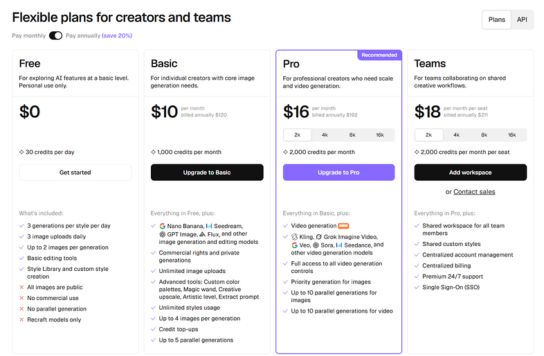
Recraft AI lists 4 plans, starting free and running to $18.
Free Plan
0/month
What’s included:
- 30 credits per day
- 3 generations per style per day
- 3 image uploads daily
- Up to 2 images per generation
- Basic editing tools
- Style Library & custom style creation
Basic Plan
10/month
What’s included:
- 1,000 credits per month
- Nano Banana, Seedream, GPT Image, Flux & other image generation & editing models
- Commercial rights and private generations
- Unlimited image uploads
- Advanced tools: Custom color palettes, Magic wand, Creative upscale, Artistic level, Extract prompt
- Unlimited styles usage
- Up to 4 images per generation
- Credit top-ups
- Up to 5 parallel generations
Pro Plan
16/month
What’s included:
- 2,000 credits per month
- Video generation NEW
- Kling, Grok Imagine Video, Veo, Sora, Seedance & other video generation models
- Full access to all video generation controls
- Priority generation for images
- Up to 10 parallel generations for images
- Up to 10 parallel generations for video
Teams Plan
18/month
What’s included:
- 2,000 credits per month per seat
- Shared workspace for all team members
- Shared custom styles
- Centralized account management
- Centralized billing
- Premium 24/7 support
- Single Sign-On (SSO)
Recraft AI Specifications
Recraft AI is available on web app, Windows and macOS and has iOS and Android apps. It offers an API, has a free trial and has a free plan.
- Deployment
- Cloud Based
- Billing cycle
- Yearly
- Desktop
- Web App
- Windows
- macOS
- Mobile
- iOS
- Android
- Languages
- En-us
- Built for
- Freelancers
- Startups
- SMEs
- Agencies
- Enterprises
- Support
- Live Support
- Training
- Tickets
- Integrations
- API, app-based workflows, export-ready design assets
- Public API
- Yes
- Free trial
- Yes
- Free plan
- Yes
- Runs in browser
- Yes
- Customisable
- Yes
- Website
- recraft.ai
Recraft AI Videos
Recraft AI Screenshots
Recraft AI Comparisons
Side by side comparisons of Recraft AI against 3 other Ai Design Software options listed here.


Recraft AI Reviews
No reviews yet
Used Recraft AI? Share your experience and help other buyers decide.
Recraft AI FAQs
Alternatives to Recraft AI
Other Ai Design Software recorded on the same fields.