Read AI
VerifiedYour AI copilot for meetings, emails, and messages
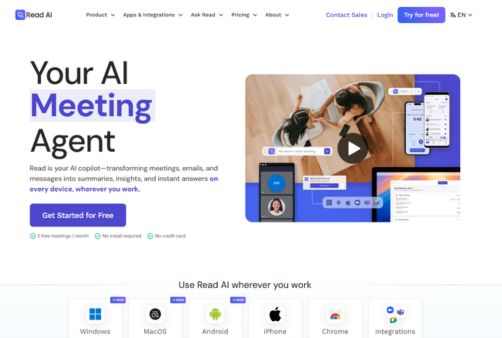 See all screenshots
 - Deployment Cloud Based
- Starting price Free
- Free trial Available
- Best for Freelancers, Startups, SMEs
What is Read AI?
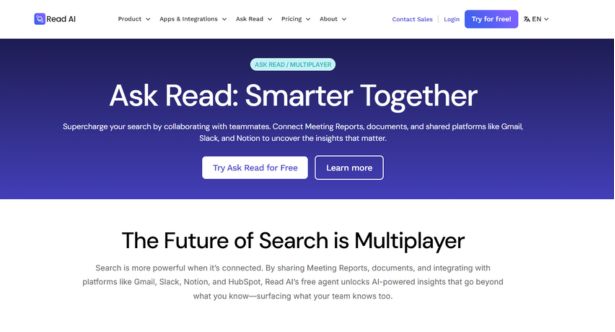
Read AI is an AI copilot designed to turn meetings, emails, and messages into actionable summaries, searchable insights, and instant answers across devices. Built for professionals, teams, and enterprises, read ai helps users save time by automatically generating meeting recaps, transcription, highlights, action items, and follow-up content without requiring an install or credit card to get started. It works across major platforms like Zoom, Google Meet, and Microsoft Teams, while also extending into email, Slack, and other workplace tools through integrations. One of its standout capabilities is Ask Read, which lets users search across conversations and documents to find context quickly, complete with citations. Read AI also offers Ada, a digital twin assistant that can help manage workflow and handle tasks on your behalf. With strong privacy controls, multilingual support, and broad integration coverage, read ai is especially valuable for busy knowledge workers, sales teams, educators, and distributed organizations that need a smarter way to capture and reuse meeting intelligence.
Key Features of Read AI
Read AI lists 6 documented features, including Meeting Intelligence, Search & Knowledge Discovery and Personal AI Assistant. The list below covers what the product does rather than how it is marketed.
- Meeting Intelligence
- Search & Knowledge Discovery
- Personal AI Assistant
- Integrations & Workflow Automation
- Security & Compliance
- Multiplatform Access
Read AI Pricing
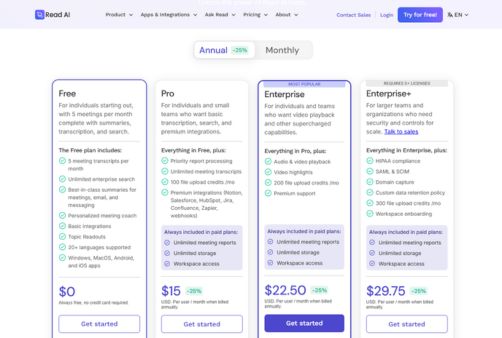
Read AI publishes 4 plans, starting at $0 on the Free Plan tier. Figures are taken from the vendor's own pricing page.
Free
Free
always free
Always free with no credit card required: integrations, topic readouts, 20+ languages and Windows, macOS, Android and iOS apps.
Paid tier 1
$19.75
per user/month
Monthly figure used; billed annually it is $15 per user per month, a 25% discount. All paid plans include unlimited meeting reports, unlimited storage and workspace access. The captured page did not label this tier by name.
Paid tier 2
$29.75
per user/month
Monthly figure used; billed annually it is $22.50 per user per month, a 25% discount. The captured page did not label this tier by name.
Paid tier 3
$39.75
per user/month
Monthly figure used; billed annually it is $29.75 per user per month, a 25% discount. The captured page did not label this tier by name.
Read AI Specifications
Read AI is available on web app, Windows and macOS and has iOS and Android apps. It offers an API, has a free trial and has a free plan.
- Deployment
- Cloud Based
- Billing cycle
- Yearly
- Desktop
- Web App
- Windows
- macOS
- Mobile
- iOS
- Android
- Languages
- En-us
- Built for
- Freelancers
- Startups
- SMEs
- Agencies
- Enterprises
- Support
- Live Support
- Training
- Integrations
- Zoom, Google Meet, Microsoft Teams, Gmail, Outlook, Slack, Google Calendar, Salesforce, HubSpot, Notion, Asana, Jira, Confluence, Google Drive, OneNote, Zapier, webhooks, Chrome extension, ChatGPT, Claude, API, MCP
- Public API
- Yes
- Free trial
- Yes
- Free plan
- Yes
- Runs in browser
- Yes
- Customisable
- Yes
- Website
- read.ai
Read AI Videos
Read AI Screenshots
Read AI Comparisons
Side by side comparisons of Read AI against 1 other Collaboration software option listed here.
Read AI Reviews
No reviews yet
Used Read AI? Share your experience and help other buyers decide.
Read AI FAQs
Alternatives to Read AI
Other Collaboration software recorded on the same fields.