Invideo AI
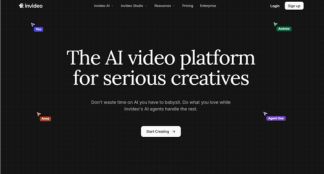
VerifiedThe AI video platform for serious creatives
 See all screenshots
 - Deployment Cloud Based
- Starting price $85/month
- Free trial Available
- Best for Freelancers, Startups, SMEs
What is Invideo AI?
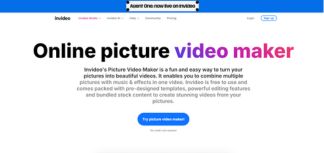
InVideo AI is an AI-powered video creation platform built for creators, marketers, founders, educators, and creative teams who want to produce high-quality videos faster without having to master complex editing tools. It combines text-to-video generation, AI video editing, AI avatars, subtitles, voice cloning, video translation, and image generation into a single workflow. The platform is especially useful for social media teams, ad creators, and filmmakers who need to turn scripts, prompts, or ideas into polished content for YouTube, Instagram, TikTok, Facebook, product promos, explainers, and microdramas. What makes InVideo AI stand out is its agent-based workflow: instead of constantly prompting the system, users can give context once and let the AI handle storyboarding, shot generation, scene changes, and revisions with long-term memory. With support for multiple AI models and stock assets, InVideo AI helps users create more while spending less time on repetitive production work.
Key Features of Invideo AI
Invideo AI lists 6 documented features, including AI Video Creation, AI Editing & Automation and Creative Story Development. The list below covers what the product does rather than how it is marketed.
- AI Video Creation
- AI Editing & Automation
- Creative Story Development
- AI Media Tools
- Platform-Specific Content
- Team Collaboration
Invideo AI Pricing
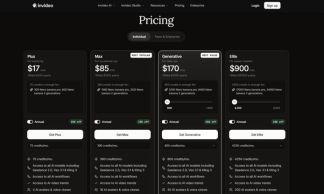
Invideo AI lists 3 plans, from $85 to $900.
Max Plan
$85/month
What’s included:
- 390 credits/month
- Access to all AI models, including Seedance 2.0, Veo 3.1 & Kling 3
- Access to all AI workflows
- Access to AI video trends
- 16 AI avatars & voice clones
- 2x more concurrency than Plus
- 100 GB storage
- 200 iStock
- Unlimited exports without watermark
Generative Plan
$170/month
What’s included:
- 800 credits/month
- Access to all AI models, including Seedance 2.0, Veo 3.1 & Kling 3
- Access to all AI workflows
- Access to AI video trends
- 40 AI avatars & voice clones
- 10x more concurrency than Plus
- 2 TB storage
- 1000 iStock
- Unlimited exports without watermark
Elite Plan
$900/month
What’s included:
- 4250 credits/month
- Access to all AI models, including Seedance 2.0, Veo 3.1 & Kling 3
- Access to all AI workflows
- Access to AI video trends
- 200 AI avatars & voice clones
- 20x more concurrency than Plus
- 10 TB storage
- 5000 iStock
- Unlimited exports without watermark
Invideo AI Specifications
Invideo AI is available on web app and has iOS and Android apps. It offers an API, has a free trial and has a free plan.
- Deployment
- Cloud Based
- Billing cycle
- Yearly
- Desktop
- Web App
- Mobile
- iOS
- Android
- Languages
- En-us
- Built for
- Freelancers
- Startups
- SMEs
- Agencies
- Enterprises
- Support
- Phone
- Live Support
- Integrations
- Stock media providers such as iStock and Storyblocks; multiple third-party AI models and tools
- Public API
- Yes
- Free trial
- Yes
- Free plan
- Yes
- Runs in browser
- Yes
- Customisable
- Yes
- Website
- invideo.io
Invideo AI Videos
Invideo AI Screenshots
Invideo AI Comparisons
Side by side comparisons of Invideo AI against 1 other AI Image Generation Software option listed here.

Invideo AI Reviews
No reviews yet
Used Invideo AI? Share your experience and help other buyers decide.
Invideo AI FAQs
Alternatives to Invideo AI
Other AI Image Generation Software recorded on the same fields.