
Flux AI
What is Flux AI?
Flux AI is a browser-based AI PCB design platform for hardware engineers, embedded teams, startups, and advanced makers. It combines schematic capture, AI-assisted research, auto-layout, BOM generation, and manufacturing-ready outputs within a single collaborative workspace. The platform supports planning, part selection with live pricing and inventory data, schematic generation, routing, and fabrication export without leaving the browser. It is designed to speed up prototype-to-production PCB workflows while keeping users in control through explainable, reversible AI actions and built-in design guardrails.
Key Features of Flux AI
Here are the powerful features that make Flux AI stand out from the competition. Packed with innovative tools and advanced functionalities, this software offers a range of benefits.
- AI PCB Design Workflow
- Research and Engineering Assistance
- Collaboration and Cloud Workspace
- Manufacturing and Supply Chain
- Import and Compatibility
- Hardware Design Support
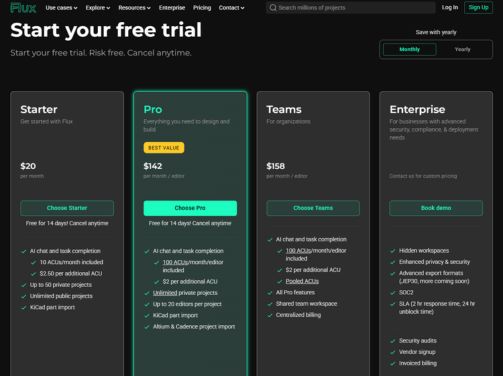
Flux AI Pricing
Here are the pricing plans for Flux AI. Choose the plan that best fits your requirements and budget.
Starter Plan
$ 20/month
What’s included:
- AI chat and task completion
- 10 ACUs/month included
- $2.50 per additional ACU
- Up to 50 private projects
- Unlimited public projects
- KiCad part import
Pro Plan
$ 142/month/editor
What’s included:
- AI chat and task completion
- 100 ACUs/month per editor included
- $2 per additional ACU
- Unlimited private projects
- Up to 20 editors per project
- KiCad part import
- Altium & Cadence project import
Teams Plan
$ 158/month/editor
What’s included:
- AI chat and task completion
- 100 ACUs/month per editor included
- $2 per additional ACU
- Pooled ACUs (shared across the team)
- All Pro features
- Shared team workspace
- Centralized billing
Enterprise Plan
$ Custom pricing
What’s included:
- Hidden workspaces
- Enhanced privacy & security
- Advanced export formats (JEP30, more coming)
- SOC2 compliance
- SLA (2hr response time, 24hr unblock time)
- Security audits
- Vendor signup
- Invoiced billing
Flux AI Specifications
Get a closer look at the technical specifications and system requirements for Flux AI. Find out if it's compatible with your operating system and other software.
- cloud based
- on premises
- hybrid
- web app
- freelancers
- startups
- smes
- agencies
- enterprises
- training
Flux AI Videos
Flux AI Screenshots


Alternatives of Flux AI
AlternativesExplore alternative software options that can fulfill similar requirements as Flux AI. Evaluate their features, pricing, and user feedback to find the perfect fit for your needs.
Flux AI Comparisons
Compare Flux AI with other similar options available. Explore the key differences to see why it's the top choice for businesses and individuals.

Overall Flux AI Reviews
Here's our unbiased review of Flux AI. Discover how our team of experts rates its features, ease of use, customer support, and other aspects that contribute to its overall appeal.