
Most complete listing

Axonify
Answers the most buyer questions in this category.
8 tools compared
Microlearning Platforms are tools that help companies train their employees in short, focused lessons. These platforms provide quick learning activities that fit into an employee’s daily work and can be accessed on any device.
Key features of Microlearning Platforms include:
Microlearning Platforms help companies train their employees more effectively. They’re different from other learning systems because they focus on quick, job-specific lessons that fit into the workday.
To be a part of the Microlearning Platform, a product must:
The main benefit of Microlearning Platforms is that they make employee training more efficient and effective. This can lead to better-trained employees, improved job performance, and more flexible learning options for companies.
Picked from the Micro Learning Software records below, by what each one is strongest at.
Most complete listing
Answers the most buyer questions in this category.
Lowest starting price

Paid plans from $0.80.
Free plan

Start without paying, upgrade later.
Compare the 8 most relevant Micro Learning Software options on price, free trial and deployment.
| Product | Starting price | Free trial | Free plan | API | Deployment |
|---|---|---|---|---|---|
| Axonify Frontline enablement tying learning to onboarding speed, launch execution and… | Quoted on request | – | – | ✓ | Cloud Based |
 Nibble Ten-minute interactive lessons for adults, with 600 items across 30… Nibble Ten-minute interactive lessons for adults, with 600 items across 30… | Quoted on request | ✓ | – | – | Cloud Based |
| TalentCards Mobile card-based training for deskless teams, priced per user from… | $0.80 | ✓ | – | ✓ | Cloud Based |
 5Mins AI TikTok-style AI microlearning priced in user bands, from GBP 200… 5Mins AI TikTok-style AI microlearning priced in user bands, from GBP 200… | £200 | ✓ | – | ✓ | Cloud Based |
 Stratbeans Learning experience platform with mobile LMS, proctored assessment and e-learning… Stratbeans Learning experience platform with mobile LMS, proctored assessment and e-learning… | Quoted on request | – | – | ✓ | Cloud Based, On Premise |
 Group.app Learning community platform combining courses, groups and branded mobile apps… Group.app Learning community platform combining courses, groups and branded mobile apps… | Quoted on request | ✓ | – | ✓ | Cloud Based |
 7taps Microlearning that reaches learners without a login, free to start… 7taps Microlearning that reaches learners without a login, free to start… | $4,995 | ✓ | – | ✓ | Cloud Based |
| SC Training (EdApp) Mobile-first microlearning LMS for frontline and deskless team training | $5/learner/month | ✓ | ✓ | – | Cloud Based |
Frontline enablement tying learning to onboarding speed, launch execution and customer experience
Axonify is a frontline enablement platform organising itself around outcomes rather than features, publishing accelerated employee onboarding to get new hires floor-ready and productive faster, flawless launch execution turning headquarters strategy into rollout, and elevated customer experience, with published customer accounts.
Organising the product around outcomes is more than presentation, because it identifies what frontline learning is actually purchased to achieve and those three outcomes are the correct ones.
Time to productivity is the first and most measurable. In retail, hospitality and similar sectors with high turnover, a substantial proportion of staff are new at any moment, and every day a new hire spends unproductive is a direct cost repeated across thousands of hires a year. Shortening that curve produces a return that can be calculated rather than asserted, which is unusual in learning.
Launch execution is the outcome most organisations underestimate. A retailer or restaurant chain decides centrally to change a process, introduce a product or run a promotion, and the result depends entirely on thousands of frontline staff across hundreds of locations doing something differently on the same day. That is a communication and training problem, and when a launch underperforms the cause is usually that the message never reached the floor in a usable form rather than that the strategy was wrong.
Customer experience is the outcome the other two produce, since in service businesses the experience is delivered by the least-trained, lowest-paid and most frequently replaced people in the organisation.
The one caution on the captured page is that the figure appearing near a currency symbol is an icon size recommendation rather than a price, so no rate should be inferred from it.
Pricing is not published, which is standard for enterprise frontline platforms quoted on workforce size.
Explore various Keka features, compare the pricing plans, and unlock the potential of seamless operations by selecting the right software for your business.
Features
View all Axonify FeaturesPricing
Axonify Caters to
Ten-minute interactive lessons for adults, with 600 items across 30 topics and 10 million downloads
Nibble is a learning application built around interactive ten minute lessons designed for busy lifestyles, publishing more than 600 content items with a new lesson weekly, 30 topics with monthly additions, and more than 10 million downloads, positioned as a top educational application for adults.
The ten minute constraint is the entire design and it is applied to general adult education rather than to corporate compliance, which makes it a different proposition from most of this category.
The problem it addresses is the gap between wanting to learn something and having the conditions to do it. Adults routinely intend to understand economics, psychology, history or science better, and the intention fails at the same point every time: the available formats assume a block of uninterrupted time that working adults with families do not reliably have. A book requires sustained attention across weeks, and an online course requires an evening that is always already spoken for.
Ten minutes exists. It exists on a commute, in a queue, while waiting for something, and requiring no more than that is what converts an intention into a habit.
The publishing cadence is the more meaningful commitment. A weekly lesson and monthly topics means the application keeps rewarding attention, and the practical failure of learning applications is exhausting their content and being deleted.
Interactivity rather than passive reading matters because the difference in retention is well established. Answering a question about material, even a simple one, produces substantially better recall than reading the same material attentively, and short-format learning has enough room for the question but not for much else.
The download figure indicates consumer scale rather than corporate deployment, so an organisation considering this for staff development should establish what team management and reporting exist, since a consumer application generally has neither.
Pricing is not published on the captured page.
Explore various Keka features, compare the pricing plans, and unlock the potential of seamless operations by selecting the right software for your business.
Features
View all Nibble FeaturesPricing
Nibble Caters to
Mobile card-based training for deskless teams, priced per user from $0.80 with no setup fees
TalentCards delivers mobile-first training built around cards, aimed at deskless workers and teams on the go, covering onboarding, reinforcement, compliance, product and student training across manufacturing and other shift-based industries, with pricing published per user and no setup fees.
The card format is the design decision and it is well matched to its intended audience, which is workers who do not have a desk, a company computer or an uninterrupted half hour.
Deskless workers are the majority of the global workforce and the group corporate learning serves worst. Training designed for an office employee at a monitor assumes conditions a warehouse operative, a retail assistant, a driver or a production line worker does not have. The result is that this population receives its training in a room at induction and almost nothing thereafter, despite doing the jobs where procedural error carries the most physical risk.
Cards work in the conditions that population actually has: a few minutes between tasks, on a phone, possibly with gloves on, and interrupted halfway through without losing progress.
Reinforcement training as a named use case is the technically substantial one. Knowledge decays predictably after initial training, and a single session followed by nothing is the standard corporate pattern and the least effective one available. Short repeated exposure over time produces far better retention for the same total minutes, and reinforcement is only practical if the delivery mechanism is light enough to use repeatedly.
Per-user pricing at low rates is what makes covering an entire deskless workforce affordable, since these populations are large and per-seat enterprise learning pricing makes full coverage prohibitive.
Pricing is published per user with rates published at $0.80 and $1.20 per user, no setup fees and no hidden costs, quoted in US dollars, with a free option published alongside.
Explore various Keka features, compare the pricing plans, and unlock the potential of seamless operations by selecting the right software for your business.
Features
View all TalentCards FeaturesPricing
TalentCards Caters to
TikTok-style AI microlearning priced in user bands, from GBP 200 with skills tracking
5Mins AI delivers AI microlearning in a short-form video format the vendor compares to TikTok, with skills tracking, covering sales and customer success training, onboarding and generative AI training, across financial services, hospitality, technology, agencies, recruitment, retail, manufacturing, legal, IT, healthcare, logistics, maritime and accounting.
The short-form video comparison is a deliberate claim about attention rather than a stylistic one, and it deserves examining honestly.
Corporate training has an engagement problem that no amount of content investment has solved. Employees assigned a 45 minute module complete it in another browser tab while doing something else, and completion statistics measure compliance rather than learning. Building content in a format people already consume voluntarily for hours is a reasonable response to that, because the format has demonstrably solved the attention problem in every other context it operates in.
The honest limitation is that format does not transfer uniformly across subject matter. Short-form works extremely well for awareness, terminology, refreshers and behaviour prompts. It works poorly for anything requiring sustained reasoning or practice, and a complex regulatory framework or a technical procedure cannot be learned in five minute fragments however engaging each fragment is.
Skills tracking is what turns consumption into something an organisation can act on, since knowing which capabilities exist across a workforce is the question learning programmes are actually meant to answer and rarely do.
The breadth of named industries alongside deskless-heavy sectors such as hospitality, retail, manufacturing, logistics and maritime suggests the format is aimed at workforces without desks, where a five minute mobile lesson is realistic and an hour at a computer is not.
Pricing is published in user bands, with published rates including GBP 200, GBP 250 and GBP 350 across bands from around 350 to 749 users.
Explore various Keka features, compare the pricing plans, and unlock the potential of seamless operations by selecting the right software for your business.
Features
View all 5Mins AI FeaturesPricing
5Mins AI Caters to
Learning experience platform with mobile LMS, proctored assessment and e-learning production services
Stratbeans publishes a learning experience platform with AI-driven personalised learning, an LMS-driven sales enablement product, a feature-rich mobile LMS, proctoring and assessment for corporate training, and authoring tools including Vyond for animated e-learning video, alongside e-learning production services.
Combining a platform with content production services is the structural characteristic and it addresses the constraint that determines whether corporate learning programmes succeed.
That constraint is content, not software. An organisation buys a learning platform, implements it, and then discovers the platform is empty. Generic library content covers common topics adequately and covers nothing specific to that organisation's products, processes, systems or regulatory context, which is precisely the training that matters most and that nobody else can supply.
Producing it in-house requires instructional design skill, media production capability and subject matter expert time, and most organisations have the third and neither of the first two. The result is a well-implemented platform delivering slide decks converted to PDFs.
Offering production services alongside is the pragmatic response, and it means the buying decision is about a capability rather than a tool.
Proctored assessment is the capability with the clearest compliance value. Where training is regulatory, the organisation must demonstrate that the named individual completed the assessment themselves, and unproctored online assessment cannot establish that, which is why regulators are sceptical of it.
The distinction between a learning experience platform and a learning management system is worth understanding here, since an LMS assigns and tracks mandatory training while an LXP surfaces content people choose. Publishing both acknowledges that organisations need compulsion for compliance and discovery for development.
Pricing is not published.
Explore various Keka features, compare the pricing plans, and unlock the potential of seamless operations by selecting the right software for your business.
Features
View all Stratbeans FeaturesPricing
Stratbeans Caters to
Learning community platform combining courses, groups and branded mobile apps for coaching programmes
GroupApp is a platform for building, selling and managing learning communities, combining structured online courses and learning paths, private groups for members and cohorts, automations with workflows and triggers, and branded mobile applications, aimed at coaching and training programmes.
Combining community with course delivery is the design position, and it reflects something well established about how people actually complete learning.
Self-paced online courses have famously poor completion rates. The content is usually adequate and the reason people stop is not difficulty but absence of obligation: nobody notices whether you continue, nobody is waiting, and there is always something more urgent. A cohort changes that entirely. Learning alongside a group who started at the same time and are visibly progressing supplies the accountability that a solitary course cannot manufacture.
Making the community the container rather than an add-on follows from that. Course-first platforms treat discussion as a feature bolted alongside lessons, and it goes unused. Community-first platforms put people at the centre, where the course is what the group is doing together rather than a library each member visits alone.
The build, sell and manage framing identifies the customer precisely: independent coaches, trainers and course creators running this as their business rather than corporate learning departments. For them the selling capability is not a convenience but the revenue mechanism, and it belongs in the same system as delivery.
Branded mobile applications matter for the same commercial reason discussed across this category. A creator's business is built on their own brand, and delivering through an application carrying somebody else's name gives away the relationship they are trying to own.
Automations handle the operational load of running cohorts, where onboarding sequences, reminders and progress nudges are what keep a programme running without the creator doing it manually every week.
Pricing is published on the vendor's pricing page but no figure was captured, so confirm current rates with the vendor.
Explore various Keka features, compare the pricing plans, and unlock the potential of seamless operations by selecting the right software for your business.
Features
View all Group.app FeaturesPricing
Group.app Caters to
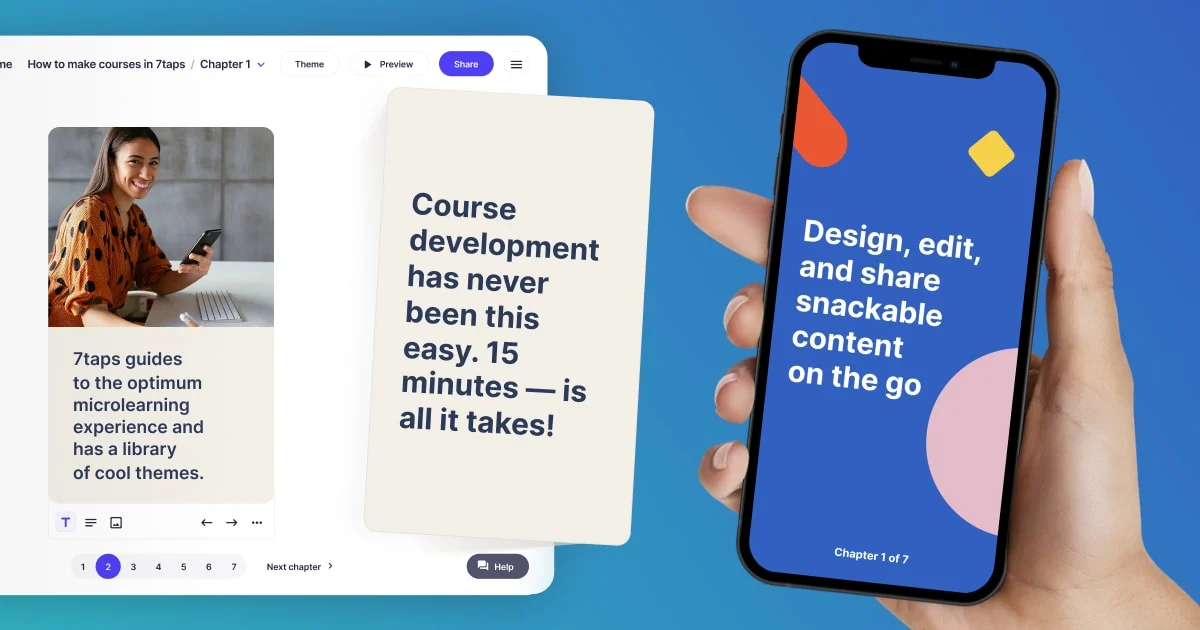
Microlearning that reaches learners without a login, free to start with a $4,995 Starter programme
7taps is a microlearning platform positioning itself as delivering learning without the friction of a traditional learning management system, published with a free tier, a Starter programme and higher tiers adding implementation assistance and priority human support, alongside a microlearning conference and published use cases.
The distinguishing property is distribution through access links rather than enrolment, and it addresses the failure that quietly defeats most corporate learning.
That failure is access. A course inside a learning management system requires the learner to remember the system exists, find their credentials, log in, locate the assignment and begin. Every one of those steps loses people, and the loss is heaviest exactly where training matters most: frontline staff, contractors, seasonal workers and anyone who does not sit at a company computer daily.
Sending a link that opens immediately removes the entire chain. The learner taps and is learning, with no account, no password reset and no help desk ticket. For a fifteen minute refresher, the login process can genuinely cost more attention than the content itself.
The trade is deliberate and should be understood before choosing it. Without enrolment there is less certainty about who completed what, and organisations with regulatory training obligations needing auditable records of named individuals completing specific content may find a link-based model insufficient on its own.
That makes the two approaches complementary rather than competing: compliance training in a system of record, and everything else through whichever channel actually reaches people.
Publishing implementation assistance and priority human support on higher tiers is a realistic acknowledgement that programmes succeed on design rather than tooling.
Pricing is published with a free tier at $0 and a Starter programme at $4,995 for organisations launching a real programme within a quarter.
Explore various Keka features, compare the pricing plans, and unlock the potential of seamless operations by selecting the right software for your business.
Features
View all 7taps FeaturesPricing
7taps Caters to
Mobile-first microlearning LMS for frontline and deskless team training
SC Training, formerly known as EdApp, is a mobile-first learning management system built by SafetyCulture and designed for microlearning, bite-sized courses that frontline and deskless employees can complete in a few minutes on their phones. It provides an AI course creator that can turn existing documents into training content, a library of over 1,000 editable courses, and engagement tools like gamification, spaced repetition, and in-lesson social learning. SafetyCulture is headquartered in Sydney, Australia.
The platform offers a genuinely free tier for up to 10 learners, a Premium plan priced at $5 per learner per month plus a required $24 per month admin seat, and a custom-priced Enterprise plan for organizations with 500 or more users. A 30-day free trial of Premium is available but requires a credit card upfront.
Explore various Keka features, compare the pricing plans, and unlock the potential of seamless operations by selecting the right software for your business.
Pricing
SC Training (EdApp) Caters to
Comparing Micro Learning Software is easier once you stop ranking features and start checking which product assumes your workflow. What follows is a practical breakdown of features, buyers, cost, and the questions worth putting to a vendor.
Micro Learning Software helps teams bring the operational admin behind micro learning work into one place rather than several disconnected tools. The practical gain is consolidation: information that would otherwise sit across spreadsheets and email threads stays in one place and stays current. The better products stay usable at small scale without becoming limiting once volume increases.
Treat the list below as a checklist rather than a requirement set, since not all of it will apply to you.
Where the fit is right, reported gains from Micro Learning Software usually include:
Micro Learning Software is used by owners and managers in micro learning work, administrative staff, and the frontline teams delivering it. Fit is decided by how you work rather than how large you are.
Worth weighing before you commit to any Micro Learning Software option:
Trial a small shortlist against genuine work rather than a vendor scenario, and let the people who will live in the tool lead that evaluation.
Micro Learning Software is usually priced per user or per location each month, with tiers reflecting the size of the operation. Pricing tends to sit above general purpose software, a function of narrow market size rather than margin. Map the pricing model to expected usage a year out rather than today, and confirm the capabilities you need sit in the tier you are pricing rather than one above it.
Micro Learning Software covers the operational side of micro learning work, holding records, scheduling and invoicing together instead of across separate tools.
Generic software leaves you building the micro learning specifics yourself, whereas Micro Learning Software ships with them at a higher price.
Fit depends on the scale Micro Learning Software was designed for, so check whether the vendor’s typical micro learning customer resembles your own operation.
Migration support varies across Micro Learning Software, so ask what the vendor imports as standard from your current micro learning records and what needs manual work.
Micro Learning Software is usually billed per seat or per site each month, and specialist micro learning tooling generally prices above generic software.
Test Micro Learning Software on genuine micro learning tasks with the people who will actually use it rather than on a scripted scenario.